User Guide
Login Credentials
| Username | Password | |
|---|---|---|
| Bitstreams UI | [email protected] | user.Bitstreams.NETINT |
| Quadra Video Server | nvme | AsicSmartVPU |
It is recommended to change the default password.
License
Bitstreams Software requires a valid license. Without a valid license the Software will operate in read-only mode.
To apply a new or updated license see the License section in the User Guide.
Location Bar
Bitstreams Manager is designed around a "location" navigation bar. The user can create an unlimited number of groups and subgroups to organize different instances. The location bar is also used to select which instance the user is controlling or managing. Changing the location to a different Bitstreams instance on the Dashboard, Server, Encoding, Template and Settings page will adjust to match the instance.
The location bar is located on the top of every page that utilizes the location bar.

Location Navigation
Clicking anywhere on the location bar will display a navigation window that allows the user to select groups, subgroups and servers (where applicable).
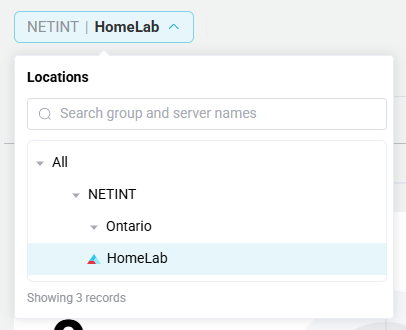
Groups or Subgroups
Hover over the group or subgroup, click the three dots ... to bring up a new menu.
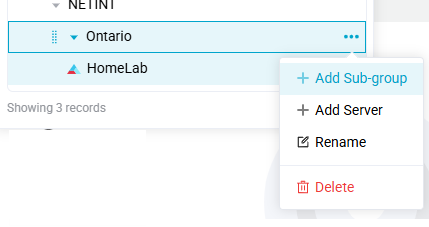
This menu allows the user to:
- Create a new group/sub-group
- Add a server to the group
- Rename the group
- Delete a group
- The group must not contain any subgroups or servers.