Encode Options
The following Quadra encoder options affect compression efficiency (quality) and performance
-
RDOQ tunes every non-zero coefficient to find a better tradeoff between rate and distortion. It can therefore improve the compression efficiency (quality) but with a penalty on performance. RDOQ is enabled when
enableRdoQuantis set to 1. -
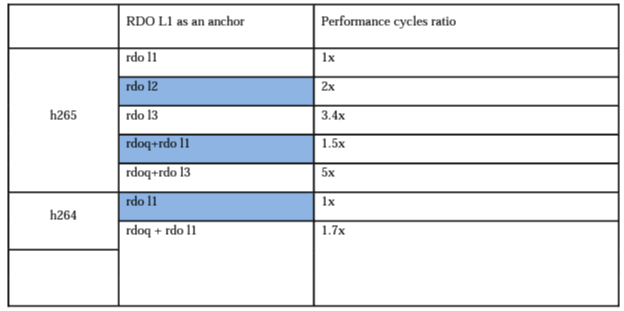
RDO Level. When the RDO level increases, the encoder selects more candidates during each mode selection stage, with an RD cost. Therefore, the overall quality will be increased but with a penalty on performance. Please refer to section “8.4 - Encoding Parameters” for a description of the
rdoLevelparameter.
The following table shows the performance penalty when using RDQQ and RDO level. Please note that this table only provides a general guideline, the actual performance impact will vary depending on the encoder load (resolution, parallel jobs, etc.)
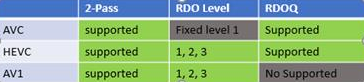
The following table shows RDOQ and RDO Level availability for each codec
-
Lookahead improves encoding quality by 2-pass encode, the 1st pass (lookahead pass) analyzes the cost and reference dependency at a macroblock level to improve 2nd pass encode compression efficiency (quality), with a penalty on performance. Lookahead is enabled when the
lookaheadDepthparameter is set to a value > = 4, please refer to section “8.4 - Encoding Parameters” for a description of lookaheadDepth parameter. -
Multicore Joint Mode improves the high resolution encode performance by utilizing all 4 hardware cores in parallel to encode. Please note when running multiple encoding instances in parallel, that this mode will not improve performance, since parallel instances already utilize multiple hardware cores. This affects rate control negatively because rate control will not be able to make any adjustment until 4 frames later (encoded in parallel), and therefore this may have a penalty on the compression efficiency (quality). Multicore joint mode is enabled when the
multicoreJointModeparameter is set to 1. -
GOP preset specifies the GOP structure used for encoding. GOP preset is selected by setting the
gopPresetIdxparameter, please refer to section “8.4 - Encoding Parameters” for a list of GOP preset indices. For a low delay application, the recommended GOP preset is 9 (all P-frames). For the highest quality, the recommended GOP preset is –1 (adaptive GOP, where the firmware dynamically adjusts the GOP pattern), this is also the default GOP preset setting. Please refer to section “8.4.3 - Gop Pattern Setting” for details of each GOP preset index. The user is also allowed to specify a customized GOP pattern by setting the GOP preset 0 (custom GOP) with a set of GOP structure syntax, please refer to section “8.4.3.1 - Custom Gop Structure". It is generally not required and not recommended to use a customized GOP pattern, since GOP preset patterns are usually a better choice. Custom Gop patterns should only be used if you cannot find an appropriate GOP preset for you application -
CBR (Constant Bitrate) rate control mode is enabled when
vbvBufferSizeis a non-zero value (default VBV buffer size is 3000) andvbvMaxRate(default 0) is left unspecified or is set to 0. Please also refer to section “8.4 - Encoding Parameters” for the description ofvbvBufferSizeparameter. In CBR mode, rate control is bound by the VBV buffer constraint, and therefore the instant bitrate will be limited and more stable.- Please also note when cuLevelRCEnable is 1 (enable block level rate control), and lookaheadDepth is 0 (no lookahead), rate control handles user specified bitrate as maximum bitrate or average bitrate depending on bitrateMode parameter, please refer to bitrateMode parameter descriptions for details.
-
ABR (Average Bitrate) rate control mode is enabled when VBV buffer size and vbvMaxRate are both set to 0, please refer to section “8.4 - Encoding Parameters” for description of
vbvBufferSizeandvbvMaxRateparameter. In ABR mode, rate control maintains average bitrate to match target bitrate, but is not constrained by VBV buffer, and therefore instant bitrate may have more fluctuations compared to CBR. On the other hand, ABR may produce bitrate more closely matching the target bitrate. -
Constrained VBR (Constrained Variable Bitrate) rate control mode is enabled when both the VBV buffer size and VBV max rate are non-zero value (default VBV buffer size is 3000, default VBV max rate is 0 (disabled)), please refer to section “8.4 - Encoding Parameters” for description of
vbvBufferSizeandvbvMaxRateparameters. Compared to CBR mode, Constrained VBR mode allows higher instant bitrate, and therefore may produce higher quality at the cost of higher peak rate. -
CRF (Constant Rate Factor) mode is enabled when
crfparameter is set to value ranging from 0 to 51, and the recommended value is 23. Please refer to section “8.4 - Encoding Parameters” for description of CRF parameter. Different from CBR rate control, in CRF mode the encoder varies the bitrate to maintain constant subjective quality. Therefore, it is not possible to predict the bitrate a CRF encode will come out to. CRF mode is generally used to encode video for offline file storage. -
Capped CRF mode is enabled when
crfparameter is set together withbitrate,vbvBufferSize,vbvMaxRate(optional),vbvMinRate(optional) to ensure a consistent quality level, while the maximum (and minimum) bitrate cap prevents the bitrate from exceeding upper bound (and lower bound) threshold, please refer to section “8.4 - Encoding Parameters” for description of these parameters. Capped CRF mode incorporates CRF with maximum (and minimum) limit bitrate limit and VBV buffer constraint. Therefore, although the encoder attempts to maintain consistent subjective quality, it is also required to cap bitrate; therefore consistent quality is no longer guaranteed. On the other hand, Capped CRF brings the benefit of bitrate control on top of CRF mode. Capped CRF mode is generally used for live streaming. Please refer to Section “8.3.4 CRF & Capped CRF Descriptions and Examples” for more details. -
HVS improves subjective quality by adjusting the macroblock level quantization parameter, according to human visual heuristics, but usually this reduces the objective quality. HVS is enabled when
hvsQPEnableparameter is set to 1. -
CU Level Rate Control is finer granularity macroblock level rate control, which may improve compression efficiency (quality). CU level rate control is enabled when
cuLevelRCEnableparameter is set to 1. -
Tolerance of Rate Control for Inter/ Intra defines how much tolerance is given to CU level rate control to match target picture size, please refer to section “8.4 - Encoding Parameters” for description of
tolCtbRcInter/tolCtbRcIntraparameters. A smaller value means less tolerance, in which case CU level rate control will make drastic adjustments at macroblock level trying to match target size. It is recommended to keep the default tolerance value. -
Rate Control QP Delta Range defines the range of quantization parameters CU level rate control is allowed to operate with, please refer to section “8.4 - Encoding Parameters” for description of
rcQpDeltaRangeparameter. A larger value means CU level rate is allowed to increase or decrease QP by larger delta value at macroblock level. It is recommended to keep the default QP delta range value. -
Bitrate Window is the window of frames in which rate control attempts to match the target bitrate, please refer to section “8.4 - Encoding Parameters” for a description of the
bitrateWindowparameter. By default, the bitrate window is equal to the intra period, or 150 if the intra period is 0 (only encode first frame as I-frame). It is recommended to keep the default bitrate window value. -
CTB Row QP Step defines the maximum accumulated QP adjustment step per CTB Row allowed by CU level rate control, please refer to section “8.4 - Encoding Parameters” for description of
ctbRowQpStepparameter. A larger value means CU level rate is allowed to increase or decrease QP by larger delta value per MB / CTB row. It is recommended to keep the default QP step value.