Low Latency Mode
Encoder
Video encode latency is defined as the delay between a video frame input to the encoder and the SAME frame output from the encoder.
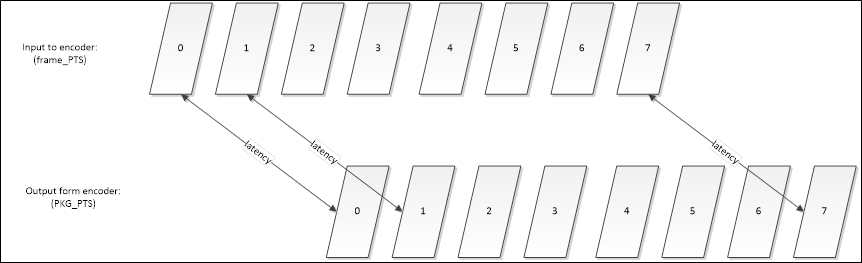
In the above encode latency diagram we can see the order of display frames is increasing sequentially. When there is a B frame, the DTS and PTS may be in different order.
GOP Requirements to Minimize Encoder Latency
As discussed above, when B frames are used the frames may need to be encoded out of order, this will increase latency. Therefore, to minimize latency we need to use a low delay GOP. A low delay GOP is one in which all the frames are encoded in sequence. On Quadra, the low delay GOPs are gopPresetIdx=1, 3, 7, and 9, or a custom GOP with in-sequence frames, for example where the pocOffset increments by 1 for each frame.
The table below lists the details of the Quadra GOP Presets.
| gopPresetIdx | Description | GOP Size | Ref Frames | Encode Order | Max Frames out of Order | Low GOP |
|---|---|---|---|---|---|---|
| 1 | All I | 1 | 2 | I0-I1-I2… | 0 | ü |
| 3 | All B | 1 | 2 | B0-B1-B2… | 0 | ü |
| 4 | BP | 2 | 2 | B1-P0-B3-P2… | 1 | |
| 5 | BBBP | 4 | 2 | B2-B1-B3-P0 | 3 | |
| 7 | Consecutive BBBB | 4 | 2 | B0-B1-B2-B3… | 0 | ü |
| 8 | BBBBBBBB | 8 | 2 | B3-B2-B4-B1-B6-B5-B7-B0… | 7 | |
| 9 | All P | 1 | 1 | P0-P2-P2 | 0 | ü |
You can see above that the low delay GOPs have all frames in-sequence. If a low delay GOP is not used then the encoder must buffer the incoming frames in order to encode them out of sequence, which adds to the encoder latency.
Encoder Low Latency Mode
The second aspect of encode latency is the buffering of input frames for better performance. The encoder allocates additional source frame buffers to the minimum, specified in the above Table. This is so that libxcoder can be downloading the next frame, while the encoder is encoding the previous frame. While this does increase performance, it adds to the latency. Therefore, we have defined a special low latency mode for the encoder. libxcoder will only send a single frame to the encoder at a time, and does not send the next frame until it receives an encoded frame. While this does reduce performance somewhat, it does ensure the lowest possible encoding latency.
The actual latency is primarily determined by the length of time to encode each frame and the number of streams being encoded. This is determined mainly by the picture size and the load on Quadra.
Quadra has 4 encoder cores, enabling encoding with 4 instances, without any increase in latency, 1 instance per encoder core. For example, if Quadra can encode 32 1080p30 streams in real time, then it takes roughly 1s/30/32≈1msec to encode a single frame. The latency will increase linearly with each group of 4 encoding instances. For example the latency for instances 1-4 would be the same, the latency for instances 5-8 would be double, etc. The encoder low latency mode is enabled with encode parameter lowDelay=1.
For example, here is a H.264 to H.265 transcode with low latency mode enabled in the encoder and a low delay GOP (gopPresetIdx=3):
ffmpeg -vsync 0 -c:v h264_ni_quadra_dec –xcoder-params “out=hw” -i input.264 -c:v h265_ni_quadra_enc -xcoder-params "gopPresetIdx=3:lowDelay=1:RcEnable=1:bitrate=4000000" output.265
If we set lowDelay=0, or omit it from the command above, the encoder will encode using normal delay mode, which is the default.
Note that low delay mode requires a low delay GOP and if enabled with a high delay GOP, an error message will be returned.
Normally, FFmpeg polls the encoder at a 200us interval when a new YUV frame is sent to the encoder, it polls until a frame is available to read. The frame is then sent to the encoder at the interval of input FPS. For example, for 50Hz input, the interval is 20ms. This way a frame sent to the encoder for encoding, will only be available after 20ms. So the latency is longer than the interval of frames. The encoder low latency mode changes this behavior. If enabled, it polls the encoder only once, and this poll request is blocking, until a frame is available to read.
Note that the latency of the first frame can be a little higher than other frames due to additional time for buffer allocation. Also note that the latency can vary from frame to frame slightly based on the complexity of the frame.
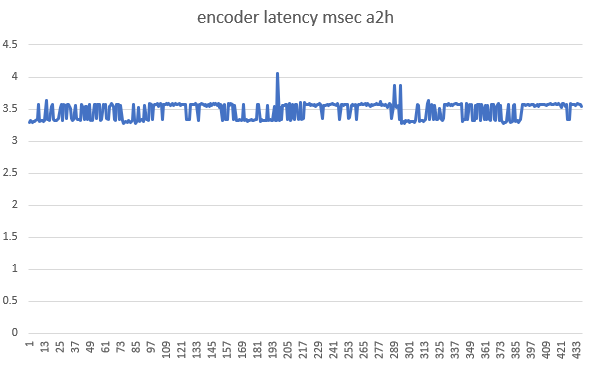
The graph below shows the measured latency for encoding a single 1080p H.265 bitstream with low delay mode enabled. The source stream is in H.264, thus the abbreviation a2h, which represents AVC to HEVC transcoding.
The command used
ffmpeg -y -nostdin -hide_banner -f concat -c:v h264_ni_quadra_dec -xcoder-params out=hw -i list.txt -c:v h265_ni_quadra_enc -xcoder-params gopPresetIdx=3:lowDelay=1:RcEnable=1:bitrate=4000000 -f null - 2>&1 |ts '%.s''
This Guide describes the encoder lowDelay parameters at Section 8.4 Encoding Parameters
Decoder
Video decode latency is defined as the delay between a video frame input to the decoder, and the same frame output from the decoder.
GOP Requirements to Minimize Decoder Latency
To minimize decode latency, a low delay GOP stream must be used in the input bitstream. A low delay GOP has all the frames encoded in sequence. See the above table for examples of such a
GOP that can be generated by the Quadra encoder.
Decode Low Latency Mode
A special decoder low latency mode has been defined such that libxcoder only sends a single frame to the decoder at a time for decoding. The libxcoder does not send the next frame until it receives the decoded frame. While this reduces performance somewhat, it ensures the lowest decoding latency possible.
Below is a command used for decoding a stream encoded in sequence:
ffmpeg -vsync 0 -c:v h264_ni_quadra_dec –xcoder-params lowDelay=1 -i input.264 -c:v h265_ni_quadra_enc output.265
This Guide describes the decoder lowDelay parameter at Section 9.1 Decoder Parameters
Summary for Minimizing Latency
To minimize decoder/encoder latency do the following:
- Use low delay GOP with in sequence frames for decoding/encoding
- For H.264 encode, using libxcoder parameter useLowDelayPocType=1 ensures that the encoded bitstream can be decoded without delay.
- Enable low delay mode in the Netint decoder or encoder