Quadra Pixel Formats
Quadra supports five pixel formats: 8-bit YUV420 planar, 8-bit YUV420 semi-planar, 10-bit YUV420 planar, 10-bit YUV420 semi-planar, RGBA, and Tiled4x4.
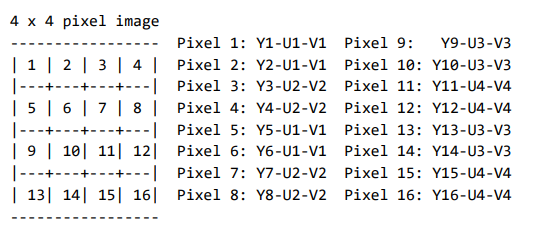
In YUV420, there is 2:1 chroma subsampling both vertically and horizontally. For every 2x2 grid of pixels, there are four luma (Y) components but only a single U and single V chroma are shared amongst the four pixels.
Below is a simple example of a 4 x 4 pixel image. Sections 7.2.1 through 7.2.4 will show the memory layout of these formats.
8-bit YUV420 planar (I420)
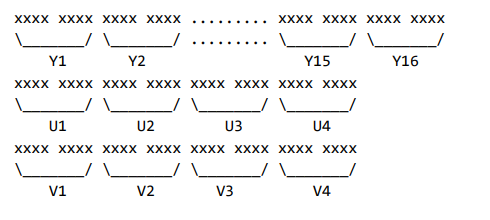
This is a common YUV420 format having eight bits per component. The components are divided into three planes. The Y components are followed by the U components which are subsequently followed by the V components.
8-bit YUV420 semi-planar (NV12)
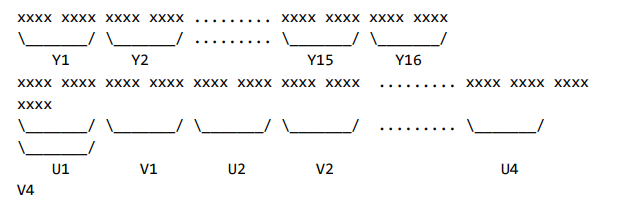
In the NV12 semi-planar format, the components are divided into two planes. The Y components are followed by a UV interleave with the U component first, V component second.
10-bit YUV420 planar
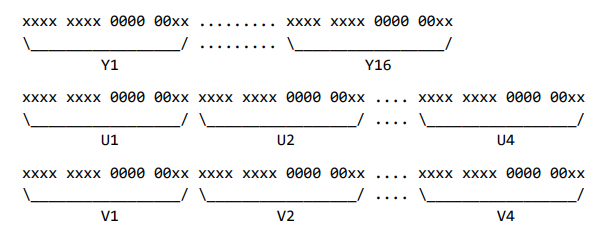
In the 10-bit YUV420 planar format, each component occupies sixteen bits of which ten of the sixteen bits are used. The least significant ten bits are used while the upper six bits are set to zero. The format is little-endian. The order of the planes is Y followed by U followed by V.
10-bit YUV420 semi-planar
In the 10-bit YUV420 semi-planar format, each component occupies sixteen bits of which ten of the sixteen bits are used. The most significant ten bits are used while the lower six bits are set to zero. The format is little-endian. The UV interleave is U first, V second.

32-bit RGBA
This is a packed 32-bit RGBA format where each pixel is represented by a four-byte value.

8 and 10-bit Tiled4x4
The tiled4x4 format is completely internal to Quadra in the sense that it cannot be hwdownloaded out of the device nor uploaded to into it. It is a compressed format and purely meant for increased memory efficiency during transcoding of large resolution inputs, ideally 10-bit.
The layout of the pixels can be simplified as lossless compressed windows of the luma and chroma plane with a small table to decode the compressed data.
YUV420 stride and memory alignment requirements in Quadra
Quadra has the following requirements regarding the frame layout in memory.
- The frame pixel width and pixel height must be even
- The frame pixel width must be a minimum of 144 pixels
- The frame pixel height must be a minimum of 128 pixels
- The horizontal stride must be a multiple of 128 bytes for both the luma and chroma planes
- The starting memory address for each luma and chroma plane must be 128-byte aligned

Note that the requirement that the stride must be a multiple of 128 bytes for both the luma and chroma planes. For example, a 1920x1080 8-bit YUV420 planar frame will have both a width of 920 pixels and a stride of 1920 bytes for the luma plane. But the chroma planes U and V will have a width of 960 pixels and a stride of 1024 bytes.
Device memory allocation and update
Quadra’s device memory usage can be detected with ni_rsrc_mon. SHARE_MEM shows the percentage of memory in use.
For decoder instance, the number of buffers allocated is determined by input stream’s header info(SPS, PPS, VPS, etc.) and decoding parameters. If a decoder instance is in hw mode(i.e, out=hw specified), 3 extra hw buffers are allocated. If a decoder instance has multiple outputs by enabling multiple ppu outputs, for example, 3 outputs, the total buffer count would be 3 * (buffer count calculated from header info). The number of buffers allocated by a decoder instance cannot be adjusted by the host once the instance is opened. From Quadra Release 5.8.0( > = 5.8.0), libxcoder could allocate additional (excluding the 3 extra hw buffers) decoder frame buffer pool before open by using xcoder parameter “extendpoolsize”. Here are the use cases:
- Setting the xcoder params for decoder when using ffmpeg command
ffmpeg -c:v h265_ni_quadra_dec -xcoder-params out=hw:extendpoolsize=7 -i input_file ... “
- Setting the decoder parameters when using libxcoder examples
./ni_xcoder_multithread_transcode -i inp.h265 -o /dev/null -m hevc -n a -d out=hw:extendpoolsize=10”
- Using API -
ni_decoder_params_set_value
The frame pool size could be changed from Quadra Release 5.8.0 only before Decoder is opened. The free occurs only on Decoder Close. Though this parameter can take values up to 252(excluding the 3 extra hw buffers), setting a large pool-size (extendpoolsize ) is not recommended for Decoders.
For encoder instance, the number of buffers allocated by it is determined by encoding parameters, for example, gop structure, lookahead depth, etc. The number of buffers allocated by encoder instance can’t be adjusted by host once open.
For uploader instance, the number of buffers allocated by it is passed from libxcoder API ni_device_session_init_framepool. Before Quadra Release 4.7.0, it’s not allowed to adjust uploader frame buffer pool once inited. From Quadra Release 4.7.0( > = 4.7.0), libxcoder could adjust uploader frame buffer pool by calling ni_device_session_update_framepool. Here is a use case:
- Host application calls ni_device_session_init_framepool to allocate frame pool with size 3. Currently, frame pool size = 3 frames.
- Host application calls ni_device_session_update_framepool to expand frame pool with size 5. At this time, frame pool size = 8 frames.
- Host application calls ni_device_session_update_framepool to free frame pool with size 0. At this time, frame pool size = 0 frames.
The frame pool size could be changed from Quadra Release 4.7.0, the frame pool type could not be changed, i.e, if the original frame pool type is p2p(NI_POOL_TYPE_P2P, this type of frames data could be transferred via p2p, see section-6.7.4), expanding uploader frame pool with normal type(NI_POOL_TYPE_NORMAL) is not allowed, and vice versa.
For scaler instance, the number of buffers allocated by it is passed from libxcoder API (ni_device_alloc_frame). Default scaler frame pool size is NI_MAX_FILTER_POOL_SIZE. Before Quadra Release 4.7.0, adjusting scaler frame buffer pool size is not allowed, so allocating scaler frame buffer pool more than once will get error. From Quadra Release 4.7.0( > = 4.7.0), libxcoder could adjust scaler frame buffer pool by calling ni_device_alloc_frame. If frame pool size passed by the API is 0, allocated but not acquired frame buffers of the scaler instance will be freed. If frame pool size passed by the API is greater than 0, the frame buffer pool will expand specified count more buffers. Here is a use case:
- host application calls ni_device_alloc_frame() to allocate frame pool with size 4. Currently, frame pool size = 4 frames.
- host application calls ni_device_alloc_frame() again to allocate frame pool with size 3. At this time, frame pool size = 7 frames.
- host application calls ni_device_alloc_frame() again to free frame pool with size 0. At this time, frame pool size = 0 frames.
The frame pool size could be changed from Quadra Release 4.7.0, the frame pool type could not be changed, i.e, if the original frame pool type is p2p(NI_POOL_TYPE_P2P, this type of frames data could be transferred via p2p, see section-6.7.4), expanding scaler frame pool with normal type(NI_POOL_TYPE_NORMAL) is not allowed, and vice versa.