Pull Stream Output (DASH/HLS)
This page assumes that you have already selected and configured the pull streaming input section.
Configure Output
warning
The URLs shown on the dashboard do not include the server IP, prepend each URL with the server IP, for example:
/live/Example.mpd -> http://<server-ip>/live/Example.mpd
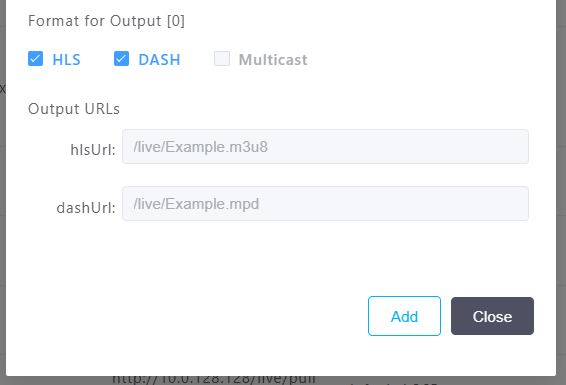
- Select the "HLS" and "DASH" checkboxes for this example in the Format for Output section.
- The Output URLs will be shown after selecting the checkboxes.
- These cannot be directly changed. The Stream Name specified will be used in the URL.
- Press the Add button on the bottom right to finish the pull stream setup.
The pull stream should now be executing as shown below:


View Pull Stream Output
For the example, both an HLS and DASH output were selected. The output URLs can be found under the Output URL section and are separated by a comma. The example shows both outputs:
- DASH -
/live/Example.mpd - HLS -
/live/Example.m3u8
A player such as VLC can be used to view the example HLS or DASH pull stream outputs.
- Select one of the outputs, DASH will be used here
/live/Example.mpd - Add the Bitstreams Edge server IP address to the front, for example:
http://10.0.0.123/live/Example.mpd - Use the complete output URL
http://10.0.0.123/live/Example.mpdin your player to view the content