MAC OS
MAC OS Firmware Upgrade
It is vital that the firmware update process (once started), is NOT interrupted. Any interruptions during firmware update may cause the device to malfunction. If a cold upgrade fails before completion then a system reboot may resolve the issue. The firmware update process should then be repeated to update the device firmware.
The User must stop all transcoding processes before performing a firmware upgrade, otherwise it may lead to a device malfunction.
A user can perform a cold upgrade on the Quadra device from a MacOS host terminal.
- List all the Quadra devices detected by running the
ni_rsrc_moncommand:
sudo ni_rsrc_mon
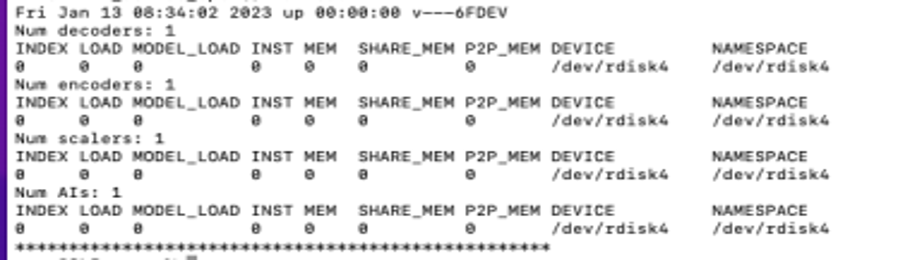
Note the “DEVICE” name of the device you wish to upgrade (eg./dev/rdisk4)
- The Quadra firmware update package is available in the Quadra SDK Release Package
cd Quadra_V<version>
- Change directory to the firmware directory
cd Quadra_FW_V*_RC*/
- Using the same command line terminal, start the
firmware_upgrade_macosexecutable. It requires two arguments to perform the firmware upgrade - The Name of the device (e.g.
/dev/rdisk4) - The Location of the
nor_flash.bin(e.g../FL_BIN/nor_flash.bin)
To upgrade, use the following command:
./firmware_upgrade_macos /dev/rdisk4 ./FL_BIN//nor_flash.bin
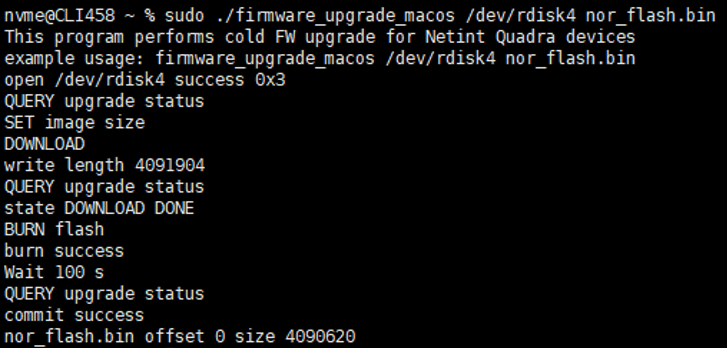
Wait for about 2 minutes for the command to complete.
- After the command completes its execution please reboot the host.
sudo reboot now
- Confirm that the firmware version has been successfully upgraded, by running the following command
sudo ni_rsrc_list
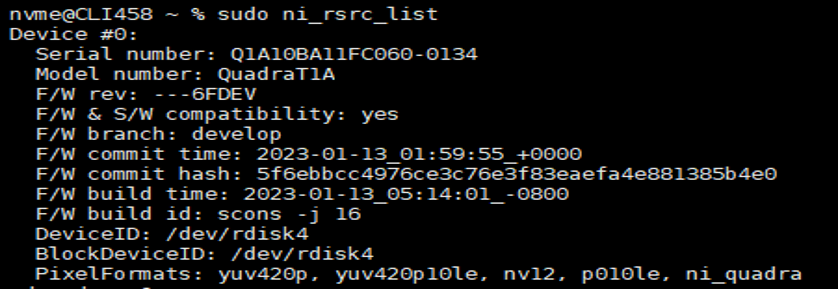 The above output shows the F/W rev has been upgraded to
 ---6FDEV.Perform these steps for each Netint device in the host.
CAUTION - Do not interrupt the upgrade process or send any commands to the card while the upgrade is progress.