Linux Guest VM with Passthrough Physical Device
Pre-requisite packages
This section was written using Ubuntu 20.04 on the host, and with the VM Guest OS also being Ubuntu 20.04.
First retrieve the Ubuntu 20.04 iso file:
wget https://mirror.it.ubc.ca/ubuntu-releases/20.04/
Then install the packages needed for KVM:
sudo apt -y install bridge-utils cpu-checker libvirt-clients libvirt-daemon qemu qemu-kvm
Use kvm-ok to ensure the environment actually supports kvm:
INFO: /dev/kvm exists
KVM acceleration can be used
Authorize a user to be able to use KVM and also the libvirt:
sudo usermod -aG kvm $USER
sudo usermod -aG libvirt $USER
sudo systemctl status libvirtd
Example:
● libvirtd.service - Virtualization daemon
     Loaded: loaded (/lib/systemd/system/libvirtd.service; enabled; vendor preset: enabled)
     Active: active (running) since Thu 2022-04-14 12:16:25 PDT; 1h 49min ago
TriggeredBy: ● libvirtd.socket
             ● libvirtd-admin.socket
             ● libvirtd-ro.socket
       Docs: man:libvirtd(8)
             https://libvirt.org
   Main PID: 1007 (libvirtd)
      Tasks: 20 (limit: 32768)
     Memory: 51.5M
     CGroup: /system.slice/libvirtd.service
             ├─1007 /usr/sbin/libvirtd
             ├─1139 /usr/sbin/dnsmasq --conf-file=/var/lib/libvirt/dnsmasq/default.conf --leasefile-ro --dhcp-script=/usr/lib/libvirt/libvirt_leaseshelper
             └─1140 /usr/sbin/dnsmasq --conf-file=/var/lib/libvirt/dnsmasq/default.conf --leasefile-ro --dhcp-script=/usr/lib/libvirt/libvirt_leaseshelper
If not enabled then enable with
sudo systemctl enable --now libvirtd
Use the virt-manager for the VM Installation:
sudo apt install virt-manager
virt-manager
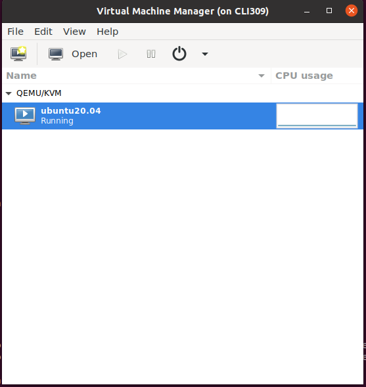
On the top left of the window click to add a new VM.
Go through the menu, and select local install, choose your ISO, then set the storage, memory and number of cores.
For the network selection, select the host device and use a bridge as the source mode.
Continue through the environment setup for the OS, such as setting timezone, etc.
Enabling IOMMU on Host
Enable the IOMMU feature via the grub configuration.
For an AMD system run:
sudo nano /etc/default/grub
Edit the line that starts with GRUB_CMDLINE_LINUX_DEFAULT to match:
GRUB_CMDLINE_LINUX_DEFAULT="amd_iommu=on iommu=pt"
If you are using an Intel system then the line should read:
GRUB_CMDLINE_LINUX_DEFAULT="intel_iommu=on"
Afterwards run this command
sudo update-grub
Then reboot the system, when these changes are complete.
Verify if the IOMMU is enabled, by running the following after a reboot:
dmesg |grep AMD-Vi
[    1.047041] pci 0000:00:00.2: AMD-Vi: IOMMU performance counters supported
[    1.048758] pci 0000:00:00.2: AMD-Vi: Found IOMMU cap 0x40
[    1.048760] pci 0000:00:00.2: AMD-Vi: Extended features (0x58f77ef22294ade):
[    1.048763] AMD-Vi: Interrupt remapping enabled
[    1.048764] AMD-Vi: Virtual APIC enabled
[    1.048765] AMD-Vi: X2APIC enabled
[    1.048867] AMD-Vi: Lazy IO/TLB flushing enabled
Add Quadra to VM
To add Quadra to a KVM, first find the identifier for Quadra’s PCIe:
lcpci
Example:
2c:00.0 SATA controller: Advanced Micro Devices, Inc. [AMD] FCH SATA Controller [AHCI mode] (rev 51)
2d:00.0 Non-Volatile memory controller: NETINT Technologies Inc. Device 0401
2e:00.0 Non-Essential Instrumentation [1300]: Advanced Micro Devices, Inc. [AMD] Starship/Matisse PCIe Dummy Function
2f:00.0 Non-Essential Instrumentation [1300]: Advanced Micro Devices, Inc. [AMD] Starship/Matisse Reserved SPP
2f:00.3 USB controller: Advanced Micro Devices, Inc. [AMD] Matisse USB 3.0 Host Controller
virsh nodedev-list --cap pci
Example
pci_0000_2a_00_1
pci_0000_2a_00_3
pci_0000_2b_00_0
pci_0000_2c_00_0
pci_0000_2d_00_0
pci_0000_2e_00_0
pci_0000_2f_00_0
pci_0000_2f_00_3
Use virsh nodedev-dumpxml pci_0000_2d_00_0 to dump Quadra’s PCIe info for the virtual machine.
<device>
  <name>pci_0000_2d_00_0</name>
  <path>/sys/devices/pci0000:00/0000:00:03.1/0000:2d:00.0</path>
  <parent>pci_0000_00_03_1</parent>
  <driver>
    <name>vfio-pci</name>
  </driver>
  <capability type='pci'>
    <class>0x010802</class>
    <domain>0</domain>
    <bus>45</bus>
    <slot>0</slot>
    <function>0</function>
    <product id='0x0401'/>
    <vendor id='0x1d82'>NETINT Technologies Inc.</vendor>
    <capability type='virt_functions' maxCount='7'/>
    <iommuGroup number='23'>
      <address domain='0x0000' bus='0x2d' slot='0x00' function='0x0'/>
    </iommuGroup>
    <numa node='0'/>
    <pci-express>
      <link validity='cap' port='0' speed='16' width='4'/>
      <link validity='sta' speed='16' width='4'/>
    </pci-express>
  </capability>
</device>
Use the information highlighted in red, to add to the virtual machine so the card can be found.
Use virsh edit yourvmname and add the following info.
<hostdev mode='subsystem' type='pci' managed='yes'>
  <source>
     <address domain='0x0000' bus='0x2d' slot='0x00' function='0x0'/>
  </source>
</hostdev>
Once completed, run virsh start yourvmname and install the required packages for Quadra, and build FFmpeg for Quadra.
Verify that the Quadra cards are detected, and follow these commands and expected outputs.
sudo nvme list
Example
Node             SN                   Model                                    Namespace Usage                      Format           FW Rev
---------------- -------------------- ---------------------------------------- --------- -------------------------- ---------------- --------
/dev/nvme0n1     Q1U02CA13BC056-0009  QuadraT1U-EP1                            1           8.59  TB /   8.59  TB      4 KiB +  0 B   ---52DEV
ni_rsrc_mon
Example
NI resource not init'd, continue ..
Reading device file: nvme0
Compatible FW API ver: 52
Block name /dev/nvme0n1
/dev/nvme0  num_hw: 4
Creating shm_name: SHM_CODERS  lck_name: /dev/shm/NI_LCK_CODERS
nvme0
decoder h/w id 0 create
ni_rsrc_fill_device_info type 0 fmt 0
Creating shm_name: shm_d0 , lck_name /dev/shm/NI_lck_d0
ni_rsrc_get_one_device_info written out.
encoder h/w id 1 create
ni_rsrc_fill_device_info type 1 fmt 0
Creating shm_name: shm_e0 , lck_name /dev/shm/NI_lck_e0
ni_rsrc_get_one_device_info written out.
scaler h/w id 2 create
ni_rsrc_fill_device_info type 2 fmt 0
Creating shm_name: shm_s0 , lck_name /dev/shm/NI_lck_s0
ni_rsrc_get_one_device_info written out.
AI h/w id 3 create
ni_rsrc_fill_device_info type 3 fmt 0
Creating shm_name: shm_a0 , lck_name /dev/shm/NI_lck_a0
ni_rsrc_get_one_device_info written out.
**************************************************
1 devices retrieved from current pool at start up
Thu Apr 14 17:52:00 2022 up 00:00:00 v---52DEV
Num decoders: 1
INDEX LOAD MODEL_LOAD INST MEM  SHARE_MEM P2P_MEM DEVICE         NAMESPACE
0     0    0          0    0    0         0       /dev/nvme0     /dev/nvme0n1
Num encoders: 1
INDEX LOAD MODEL_LOAD INST MEM  SHARE_MEM P2P_MEM DEVICE         NAMESPACE
0     0    0          0    0    0         0       /dev/nvme0     /dev/nvme0n1
Num scalers: 1
INDEX LOAD MODEL_LOAD INST MEM  SHARE_MEM P2P_MEM DEVICE         NAMESPACE
0     0    0          0    0    0         0       /dev/nvme0     /dev/nvme0n1
Num AIs: 1
INDEX LOAD MODEL_LOAD INST MEM  SHARE_MEM P2P_MEM DEVICE         NAMESPACE
0     0    0          0    0    0         0       /dev/nvme0     /dev/nvme0n1
**************************************************