Encoding, Decoding and Transcoding Testing
Once the previous sections for installation are complete, the host and Quadra device are now ready for use.
The user can now run the run_ffmpeg_quadra.sh script to test basic encoding, decoding and transcoding features.
To test the systems, change directory to the FFmpeg root folder and run the following command line.
bash run_ffmpeg_quadra.sh
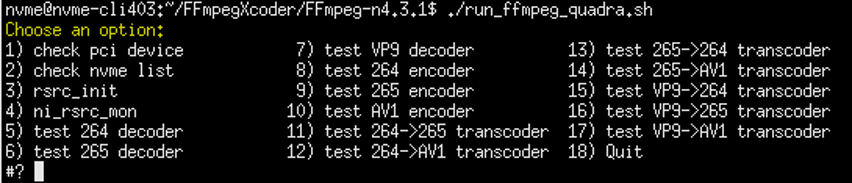
After running script the test menu above is shown. Select tests to run (1 to 18):
| 1 | check pci device | Will list all NETINT PCIe devices on the system |
| 2 | check nvme list | Will call sudo nvme list listing all installed NVMe devices. |
| 3 | rsrc_init | This will call ../libxcoder/build/init_rsrc to initialize all Quadras. |
| 4 | ni_rsrc_mon | This runs the resource monitor |
| 5 | test 264 decoder | Tests h264- > yuv decoding function. After the decoding is finished it will display the output.yuv |
| 6 | test 265 decoder | This item will test the h265- > yuv decoding function. After the decoding is finished it will display the output.yuv file |
| 7 | test vp9 decoder | This item will test the vp9- > yuv decoding function. After the decoding is finished it will display the output.yuv |
| 8 | test 264 encoder | This option will test the yuv- > h264 encoding function. After the encoding is finished it will display the output.264 file |
| 9 | test 265 encoder | This item will test the yuv- > h265 encoding function. After the encoding is finished it will display the output.265 file |
| 10 | test av1 encoder | This item will test the yuv- > av1 encoding function. After the encoding is finished it will display the output.av1 file |
| 11 | test 264- > 265 transcoder | This item will test the h264 to h265 transcoding function. After the transcoding is finished it will display the output.265 file. |
| 12 | test 264- > av1 transcoder | This option will test the h264 to av1 transcoding function. After the transcoding is finished, it will display the output.av1 file |
| 13 | test 265- > 264 transcoder | This item will test the h265 to h264 transcoding function. After the transcoding is finished it will display the output.264 file |
| 14 | test 265- > av1 transcoder | This item will test the h265 to av1 transcoding function. After the transcoding is finished it will display the output.av1 file |
| 15 | test vp9- > 264 transcoder | This item will test the vp9 to h264 transcoding function. After the transcoding is finished it will display the output.264 file. |
| 16 | test vp9- > 265 transcoder | This item will test the vp9 to h265 transcoding function. After the transcoding is finished it will display the output.265 file. |
| 17 | test vp9- > av1 transcoder | This item will test the vp9 to av1 transcoding function. After the transcoding is finished it will display the output.av1 file. |
| 18 | Quit | This will quit this menu and return the user to the command line. |
All FFmpeg output messages from encoding, decoding or transcoding, will be output to the ffmpeg.log file contained in the same folder as the record.
note
Between different releases, the encoded file size may be slightly different from the number recorded by the run_ffmpeg_quadra.sh script. This is normal and expected.