GOP Structure and Customization
Quadra supports three ways to set the gop patterns. The first method is the default method, where gopPresetIdx = -1 or is not set. By default, encoder uses Adaptive Gop, for which the encoder dynamically adjusts gop pattern while encoding. The second method is setting custom gop structures via xcoder-gop parameters, where gopPresetIdx must be set to 0. The third method is the preset gop structure, where gopPresetIdx can be set from 1 to 10.
Now we introduce the custom gop structure and the predefined gop structures in detail. Some commonly used gop patterns are shown below as examples.
Quadra generates all I‑frames as IDR frames that include the relevant headers/parameter sets where defined (H.264: SPS/PPS; H.265: VPS/SPS/PPS, AV1: key frames with sequence header OBU).
Custom Gop Structure
The following table lists the custom gop parameters, xcoder-gop.
The order of the custom GOP parameters does not matter. E.g. g2numRefPics can be placed before g0numRefPics
Quadra Custom Gop Parameters (xcoder-gop)
| Parameter | Values | Description |
|---|---|---|
| customGopSize | 1 to 8 | Specifies size of custom GOP pattern. |
in following frame parameters, prefix g0 means this setting corresponds to the 1st frame in the gop structure, g1 corresponds to the 2nd frame in gop structure, and so on
Number of frames in gop structure (e.g. g0, g1, …) must match customGopSize
Frame Parameters
| Parameter | Values | Description |
|---|---|---|
| g0pocOffset | 1 to gop size | POC (display order) of the frame within a GOP, ranging from 1 to gop size |
| g0QpOffset | -51 to 51 | Delta QP, will be added to the frame QP to set the final QP |
| g0temporalId | 0 to highest temporal layer in the gop | temporal layer ID |
| g0picType | 1: P frame 2: B frame | Frame type, can be either P or B frame |
| g0numRefPics | 1 to gop size | Number of reference pictures kept for this frame, including references for current and future pictures. NOTE - in the following Reference List parameters, prefix g0refPic0 means the setting corresponds to 1st reference frame, g0refPic1 corresponds to 2nd reference frame, and so on NOTE – if a reference frame will be referenced by future frame(s) but is not referenced by the current frame, it would need to be included in current frame reference list as well. For example, in hierarchical-P GOP pattern (see Custom GOP Example 3), Frame 3 only references Frame 2, but its reference list must also include Frame 0 for Frame 4 to reference; therefore g2numRefPics=2 NOTE - Number of Reference List parameters must match g0numRefPics NOTE - The maximum number of reference frames referenced by the current picture is 2 |
Reference List parameters
| Parameter | Values | Description |
|---|---|---|
| g0refPic0 | - (gop size) to gop size 0 is not allowed | Delta POC of the reference picture, relative to the POC of the current frame NOTE - g0refPic0 cannot be 0, since a picture cannot refer to itself NOTE – the index of reference frames (E.g. g0refPic0, g0refPic1, etc.) in the reference list must follow order described below 1. Forward references (past) must precede Backward references (future) 2. Forward references (past) must be in poc order High to Low 3. Backward references (future) must be in poc order Low to High The purpose is to assign lower indices to reference frames closet to the current frame in display order, because these are the reference frames which are most often used for reference, and lower reference index helps to reduce bit count For example, in hierarchical-P GOP pattern (see Custom GOP Example 3), Frame 3 reference list must assign index 0 (g2refPic0) to Frame 2 (g2refPic0=-1), and assign index 1 (g2refPic1) to Frame 0 (g2refPic1=-3) |
| g0refPic0Used | 0: Not referenced by current frame 1: Referenced by current frame | Specifies whether each reference frame in reference list is used in current (1) or future (0) |
Custom GOP Example 1 (GOP size 2, low delay):

ffmpeg -y -f rawvideo -pix_fmt yuv420p -s:v 1440x1080 -r 24 -i input1440x1080.yuv -c:v h264_ni_quadra_enc -vframes 50 -xcoder-params 'profile=2:level=6:RcEnable=1:bitrate=10000000:intraPeriod=0:gopPresetIdx=0' -xcoder-gop "customGopSize=2:g0pocOffset=1:g0QpOffset=0:g0temporalId=0:g0picType=2:g0numRefPics=2:g0refPic0=-1:g0refPic0Used=1:g0refPic1=-3:g0refPic1Used=1:g1pocOffset=2:g1QpOffset=0:g1temporalId=0:g1picType=2:g1numRefPics=2:g1refPic0=-1:g1refPic0Used=1:g1refPic1=-2:g1refPic1Used=1" -enc 0 output1440x1080.h264
Custom GOP Example 2 (Hierarchical-B with GOP size 4):
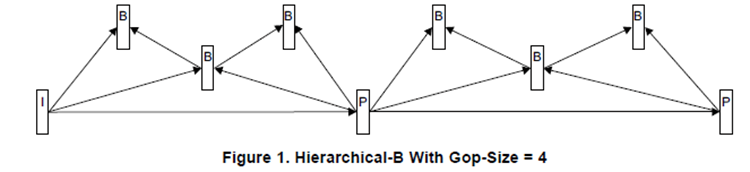
ffmpeg -y -f rawvideo -pix_fmt yuv420p -s:v 1440x1080 -r 24 -i input1440x1080.yuv -c:v h264_ni_quadra_enc -vframes 50 -xcoder-params 'profile=2:level=6:RcEnable=1:bitrate=10000000:intraPeriod=0:gopPresetIdx=0' -xcoder-gop "customGopSize=4:g0pocOffset=4:g0QpOffset=0:g0temporalId=0:g0picType=1:g0numRefPics=1:g0refPic0=-4:g0refPic0Used=1:g1pocOffset=2:g1QpOffset=0:g1temporalId=0:g1picType=2:g1numRefPics=2:g1refPic0=-2:g1refPic0Used=1:g1refPic1=2:g1refPic1Used=1:g2pocOffset=1:g2QpOffset=0:g2temporalId=0:g2picType=2:g2numRefPics=3:g2refPic0=-1:g2refPic0Used=1:g2refPic1=1:g2refPic1Used=1:g2refPic2=3:g2refPic2Used=0:g3pocOffset=3:g3QpOffset=0:g3temporalId=0:g3picType=2:g3numRefPics=2:g3refPic0=-1:g3refPic0Used=1:g3refPic1=1:g3refPic1Used=1" -enc 0 output1440x1080.h264
Custom GOP Example 3 (Hierarchical-P with GOP size 4):
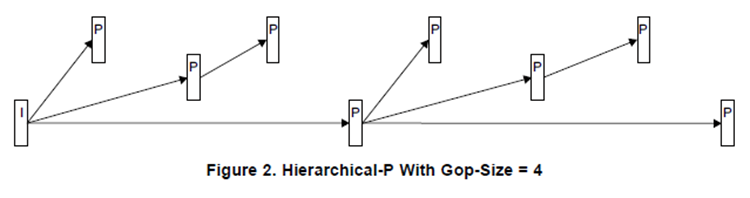
ffmpeg -y -f rawvideo -pix_fmt yuv420p -s:v 1440x1080 -r 24 -i input1440x1080.yuv -c:v h264_ni_quadra_enc -vframes 50 -xcoder-params 'profile=2:level=6:RcEnable=1:bitrate=10000000:intraPeriod=0:gopPresetIdx=0' -xcoder-gop " customGopSize=4:g0pocOffset=1:g0QpOffset=0:g0temporalId=0:g0picType=1:g0numRefPics=1:g0refPic0=-1:g0refPic0Used=1:g1pocOffset=2:g1QpOffset=0:g1temporalId=0:g1picType=1:g1numRefPics=1:g1refPic0=-2:g1refPic0Used=1:g2pocOffset=3:g2QpOffset=0:g2temporalId=0:g2picType=1:g2numRefPics=2:g2refPic0=-1:g2refPic0Used=1:g2refPic1=-3:g2refPic1Used=0:g3pocOffset=4:g3QpOffset=0:g3temporalId=0:g3picType=1:g3numRefPics=1:g3refPic0=-4:g3refPic0Used=1" -enc 0 output1440x1080.h264
Pre-defined GOP Structure
The gopPresetIdx are pre-configured gop patterns that fit most applications without the complexity of configuring a custom gop.
According to the different values set for the gopPresetIdx, lookAheadDepth, and enable2PassGop parameters, the gop structure can be divided into two types:
- 1-pass, lookaheadDepth = 0, enable2PassGop takes no effects, the gop structure is determined by gopPresetIdx.
- 2-pass, lookaheadDepth > 0, the gop structure is determined by gopPresetIdx and enable2PassGop.
Here are the predefined GOP structures for H.264 / H.265 / AV1.
Preset GOP Patterns for AVC / HEVC / AV1
1-pass encode (lookaheadDepth = 0)
temporal ID field only takes effects when parameter temporalLayersEnable is set to 1. When temporalLayersEnable is not specified (default 0), all frames are assigned temporal ID 0
| gopPresetIdx | frame | Type | POC | QP offset | num of ref | Reference List | used_by cur | temporal ID * | |
| -1 | Adaptive Gop(default) | ||||||||
| 0 | Custom Gop | ||||||||
| 1 | 1 | I | 1 | 1 | 0 | X | X | 0 | |
| 2 | obsolete | ||||||||
| 3 | 1 | B | 1 | 1 | 2 | -1 -2 | 1 | 0 | |
| 4 | 1 | P | 2 | 1 | 1 | -2 | 1 | 0 | |
| 2 | B | 1 | 3 | 2 | -1 1 | 1 1 | 1 | ||
| 5 | 1 | P | 4 | 1 | 1 | -4 | 1 | 0 | |
| 2 | B | 2 | 3 | 2 | -2 2 | 1 1 | 1 | ||
| 3 | B | 1 | 5 | 3 | -1 1 3 | 1 1 0 | 2 | ||
| 4 | B | 3 | 5 | 2 | -1 1 | 1 1 | 2 | ||
| 6 | obsolete | ||||||||
| 7 | 1 | B | 1 | 5 | 2 | -1 -5 | 1 1 | 0 | |
| 2 | B | 2 | 3 | 2 | -1 -2 | 1 1 | 0 | ||
| 3 | B | 3 | 5 | 2 | -1 -3 | 1 1 | 0 | ||
| 4 | B | 4 | 1 | 2 | -1 -4 | 1 1 | 0 | ||
| 8 | 1 | B | 8 | 1 | 2 | -8 -16 | 1 1 | 0 | |
| 2 | B | 4 | 3 | 2 | -4 4 | 1 1 | 1 | ||
| 3 | B | 2 | 5 | 3 | -2 2 6 | 1 1 0 | 2 | ||
| 4 | B | 1 | 7 | 4 | -1 1 3 7 | 1 1 0 0 | 3 | ||
| 5 | B | 3 | 7 | 4 | -1 -3 1 5 | 1 0 1 0 | 3 | ||
| 6 | B | 6 | 5 | 3 | -2 -6 2 | 1 0 1 | 2 | ||
| 7 | B | 5 | 7 | 4 | -1 -5 1 3 | 1 0 1 0 | 3 | ||
| 8 | B | 7 | 7 | 3 | -1 -7 1 | 1 0 1 | 3 | ||
| 9 | 1 | P | 1 | 1 | 1 | -1 | 1 | 0 | |
| 10 | 1 | P | 1 | 5 | 1 | -1 | 1 | 2 | |
| 2 | P | 2 | 3 | 1 | -2 | 1 | 1 | ||
| 3 | P | 3 | 5 | 2 | -1 -3 | 1 0 | 2 | ||
| 4 | P | 4 | 1 | 1 | -4 | 1 | 0 | ||
2-pass encode (lookaheadDepth > 0 and enable2PassGop = 0)
temporal ID field only takes effects when parameter temporalLayersEnable is set to 1. When temporalLayersEnable is not specified (default 0), all frames are assigned temporal ID 0
2-pass encode algorithm adjusts QP. Therefore, picQp may not be reflected in coded frame
| gopPresetIdx | frame | Type | POC | QP offset | num of ref | Reference List | used_by cur | temporal ID * | |
| -1 | Adaptive Gop(default) | ||||||||
| 0 | Custom Gop | ||||||||
| 1 | Not supported for 2-pass | ||||||||
| 2 | obsolete | ||||||||
| 3 | Not supported for 2-pass | ||||||||
| 4 | 1 | B | 2 | 1 | 2 | -2 -4 | 1 1 | 0 | |
| 2 | B | 1 | 3 | 2 | -1 1 | 1 1 | 1 | ||
| 5 | 1 | B | 4 | 1 | 2 | -4 -8 | 1 1 | 0 | |
| 2 | B | 2 | 3 | 2 | -2 2 | 1 1 | 1 | ||
| 3 | B | 1 | 5 | 3 | -1 1 3 | 1 1 0 | 2 | ||
| 4 | B | 3 | 5 | 3 | -1 -3 1 | 1 0 1 | 2 | ||
| 6 | obsolete | ||||||||
| 7 | Not supported for 2-pass | ||||||||
| 8 | 1 | B | 8 | 1 | 2 | -8 -16 | 1 1 | 0 | |
| 2 | B | 4 | 3 | 2 | -4 4 | 1 1 | 1 | ||
| 3 | B | 2 | 5 | 3 | -2 2 6 | 1 1 0 | 2 | ||
| 4 | B | 1 | 7 | 4 | -1 1 3 7 | 1 1 0 0 | 3 | ||
| 5 | B | 3 | 7 | 4 | -1 -3 1 5 | 1 0 1 0 | 3 | ||
| 6 | B | 6 | 5 | 3 | -2 -6 2 | 1 0 1 | 2 | ||
| 7 | B | 5 | 7 | 4 | -1 -5 1 3 | 1 0 1 0 | 3 | ||
| 8 | B | 7 | 7 | 3 | -1 -7 1 | 1 0 1 | 3 | ||
| 9 | 1 | P | 1 | 1 | 1 | -1 | 1 | 0 | |
| 10 | Not supported for 2-pass | ||||||||
2-pass encode (lookaheadDepth > 0 and enable2PassGop=1)
| gopPresetIdx | frame | Type | POC | QP offset | num of ref | Reference List | used_by cur | temporal ID * | |
| -1 | Adaptive Gop(default) | ||||||||
| 0 | Custom Gop | ||||||||
| 1 | Not supported for 2-pass | ||||||||
| 2 | obsolete | ||||||||
| 3 | Not supported for 2-pass | ||||||||
| 4 | 1 | P | 2 | 1 | 1 | -2 | 1 | 0 | |
| 2 | B | 1 | 3 | 2 | -1 1 | 1 1 | 1 | ||
| 5 | 1 | P | 4 | 1 | 1 | -4 | 1 | 0 | |
| 2 | B | 2 | 3 | 2 | -2 2 | 1 1 | 1 | ||
| 3 | B | 1 | 5 | 3 | -1 1 3 | 1 1 0 | 2 | ||
| 4 | B | 3 | 5 | 2 | -1 1 | 1 1 | 2 | ||
| 6 | obsolete | ||||||||
| 7 | Not supported for 2-pass | ||||||||
| 8 | 1 | P | 8 | 1 | 1 | -8 | 1 | 0 | |
| 2 | B | 4 | 3 | 2 | -4 4 | 1 1 | 1 | ||
| 3 | B | 2 | 5 | 3 | -2 2 6 | 1 1 0 | 2 | ||
| 4 | B | 1 | 7 | 4 | -1 1 3 7 | 1 1 0 0 | 3 | ||
| 5 | B | 3 | 7 | 3 | -1 1 5 | 1 1 0 | 3 | ||
| 6 | B | 6 | 5 | 2 | -2 2 | 1 1 | 2 | ||
| 7 | B | 5 | 7 | 3 | -1 1 3 | 1 1 0 | 3 | ||
| 8 | B | 7 | 7 | 2 | -1 1 | 1 1 | 3 | ||
| 9 | 1 | P | 1 | 1 | 1 | -1 | 1 | 0 | |
| 10 | Not supported for 2-pass | ||||||||
Description of GOP Patterns
The following is the gop structure for when gopPresetIdx=5, lookaheadDepth = 0 or for when gopPresetIdx = 5, lookahead > 0, enable2Pass=1.
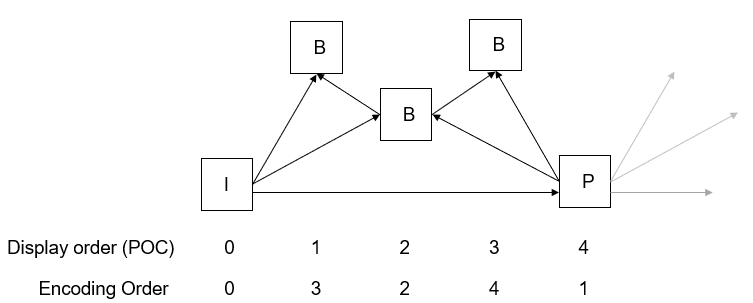
The four frames in this gop are described below in decoding order.
- Frame 1 is a P frame with POC 4, referencing one frame with POC 0. The reference frame is defined by delta POC value relative to current frame. In this case it is -4.
- Frame 2 is a B frame with POC 2, referencing two frames with POC 0 and 4 respectively. So its reference frames are listed as -2 and 2.
- Frame 3 is a B frame with POC 1, referencing two frames with POC 0 and 2 respectively. It also needs to keep the frame with POC 4 as a reference frame to be used in future. So its reference frame list is -1, 1 and 3.
- Frame 4 is a B frame with POC 3, referencing two frames with POC 2 and 4 respectively. Its reference list is -1 and 1.
The corresponding GOP structure table is show below, where:
- QP Offset will be added to the QP parameter to set the final QP;
- Used by Current Frame specifies whether each reference frame in Reference List is used in current(1) or future(0).
| Frame | Type | POC | QP Offset | Number of References | Reference List | used_by_cur |
| 1 | P | 4 | 1 | 1 | -4 | 1 |
| 2 | B | 2 | 3 | 2 | -2 2 | 1 1 |
| 3 | B | 1 | 5 | 3 | -1 1 3 | 1 1 0 |
| 4 | B | 3 | 5 | 2 | -1 1 | 1 1 |
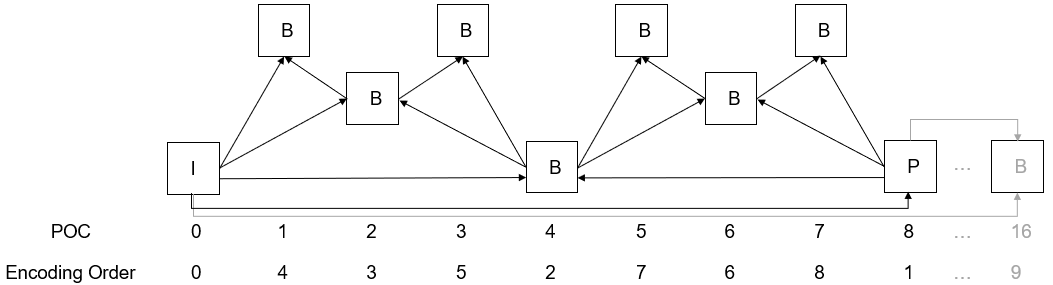
The diagrams of all gop patterns for 1 pass (lookAheadDepth=0) are shown below. P and B pictures can have one to multiple reference frames as illustrated by the arrows. The inter frame immediately after I-frame is encoded as P-frame, although it appears in the table as B-frame because only one reference frame is available:
Diagram of gopPresetIdx=1

Diagram of gopPresetIdx=3

Diagram of gopPresetIdx=4
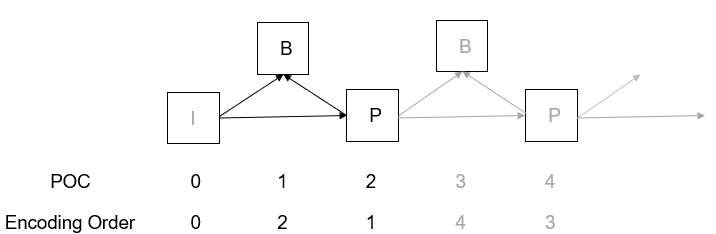
Diagram of gopPresetIdx=5
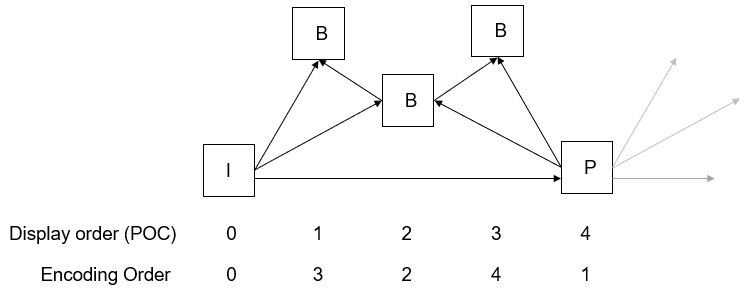
Diagram of gopPresetIdx=7
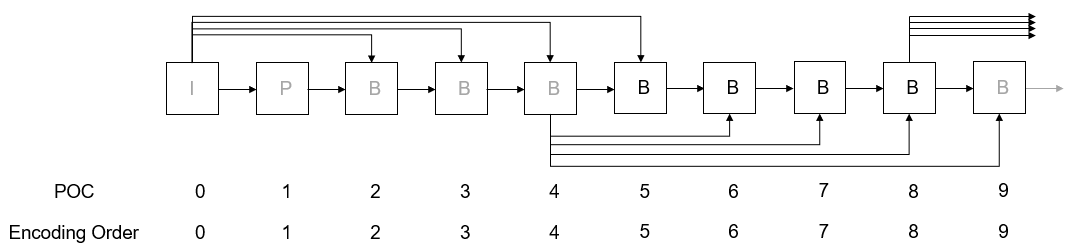
Diagram of gopPresetIdx=8
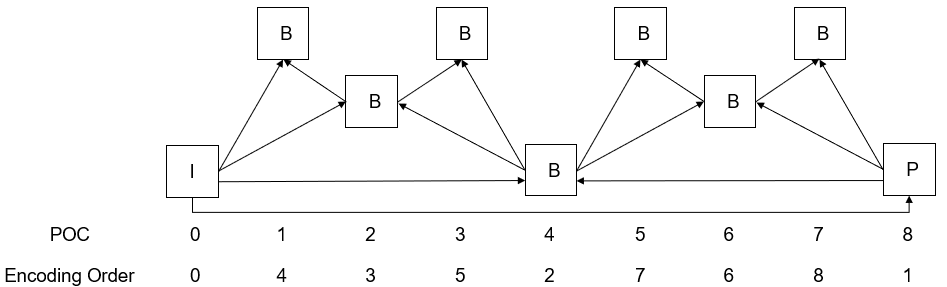
Diagram of gopPresetIdx=9

Note that frame number count is relative to adjacent frames. For example, in the gopPresetIdx=9 diagram above, if the user sees encoding order frame number 2 as frame 0, the adjacent frame numbers should change accordingly. The following diagram shows the case when the user sees encoding order frame number 2 as 0 in the diagram above. This helps to better interpret the indexes on the table.

Diagram of gopPresetIdx=10
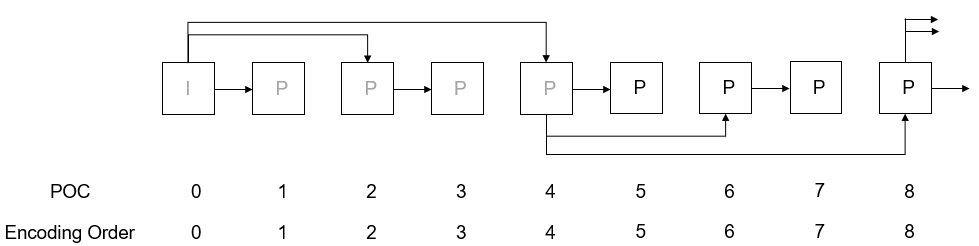
The diagrams of gop patterns for 2 pass (2-pass & enable2PassGop=0) are shown below:
Diagram of gopPresetIdx=4 for 2 pass
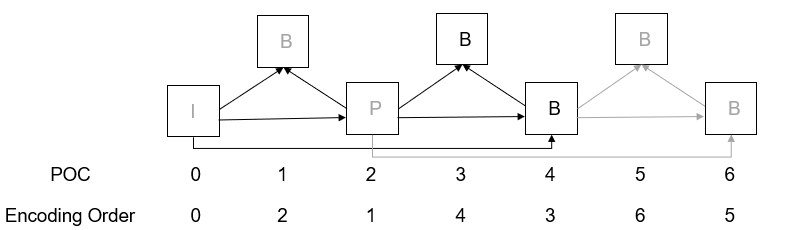
Diagram of gopPresetIdx=5 for 2 pass
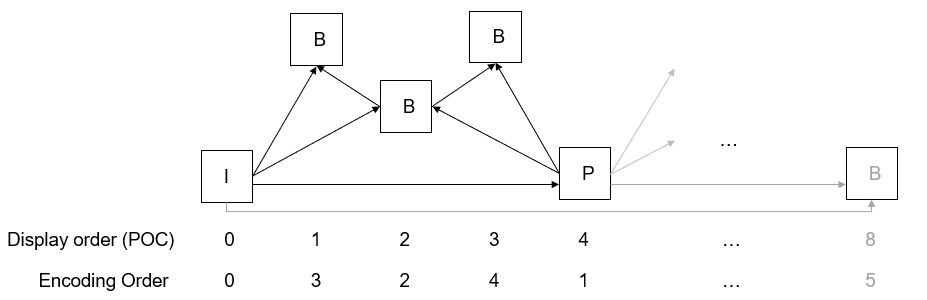
Diagram of gopPresetIdx=8 for 2 pass