Long Term Reference
The Libxcoder encoder configuration parameter longTermReferenceEnable is used to enable the Long Term Reference (LTR) feature when opening an encoder instance.
The Long Term Reference is enabled by setting longTermReferenceEnable=1.
When longTermReferenceEnable=1, the IDR frames are automatically set as LTR (regardless of longTermReferenceInterval or other settings).
When longTermReferenceEnable=1, the user can set the LTR by either one or both of these methods:
- Set the LTR interval at configuration by longTermReferenceInterval, and/or change LTR interval during run-time by libxcoder API
- Set any frame as LTR during runt-time by libxcoder API
For more details regarding libxcoder API integration, please refer to the Libxcoder API Integration Guide, or Application Note APPS528 - Long Term Reference & Reference Invalidation Application Note
When the longTermReferenceEnable=1, the user can also set the number of LTRs (1 or 2) using the longTermReferenceCount parameter**.**
Example 1: longTermReferenceEnable=1 or longTermReferenceEnable=1:longTermReferenceInterval=0 will cause the IDR frame to be a long term reference frame.
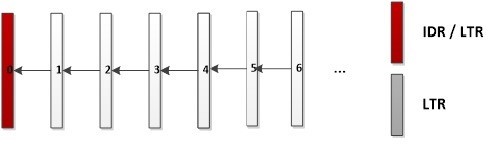
Example 2: longTermReferenceEnable=1:longTermReferenceInterval=10:longTermReferenceCount=2 will cause the IDR frame to be the long term reference frame, and every 10th frame to also be a long term reference frame.
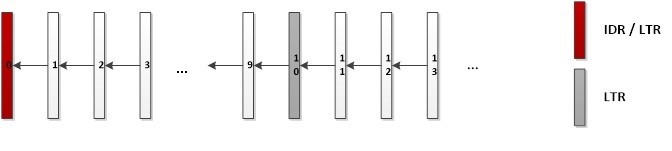
Up to 2 LTPs to be preserved – E.g. Frame 20 replaces the oldest LTR frame 0, so that frame 10 and frame 20 are the current LTR frames.
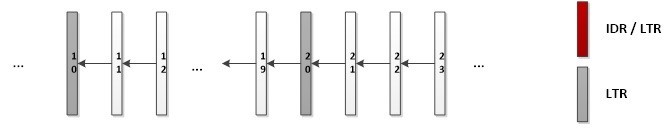
Example 3:
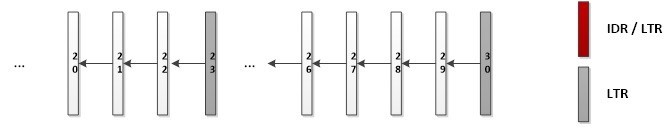
longTermReferenceEnable=1:longTermReferanceInterval=10:longTermReferenceCount=2, using the libxcoder API and setting frame 23 as LTR will cause up to 2 LTRs to be preserved – e.g frame 23 replaces the oldest LTR frame 10, so that frame 20 and frame 23 are the current LTR frames.

The next LTR will be frame 30 at LTR interval, replacing the oldest LTR frame 20, so that frame 23 and frame 30 are the current LTR frames.
NOTE - I-Frame clears all existing LTRs and resets LTR interval counter. I-Frame itself is automatically set as the new LTR.
For example, if longTermReferenceInterval = 4, longTermReferenceCount = 2, intraPeriod = 15
- Frame 15 will be set as LTR1, Frame 19 will be set as LTR2
Reference Invalidation
Reference invalidation is used by the receiver of the bitstream to invalidate and change the encoding frames’ references when the received packet is corrupted (and therefore cannot be referenced).
Since the need to invalidate reference only arises when the receiving end detects corrupted frame during run-time, reference invalidation requires libxcoder API integration.
For more details regarding libxcoder API integration, please refer to Libxcoder API Integration Guide, or Application Note APPS528 - Long Term Reference & Reference Invalidation Application Note
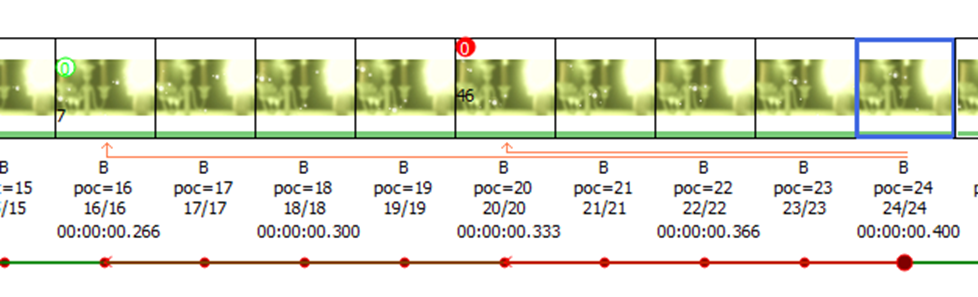
Reference Invalidation is illustrated below. Without reference invalidation Frame 24 refers to Frames 23 and 20:
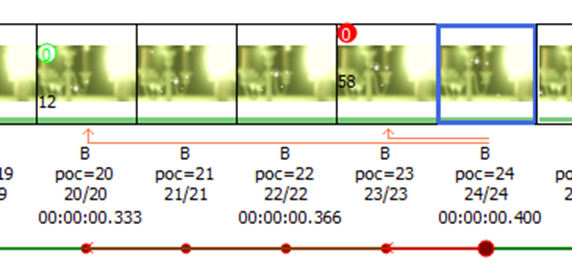
In the following example, encoding Frame 24 invalidates all references with frame number > = 21. Since reference frame 23 is invalidated, Frame 24 now refers to Frames 20 and 16
The frame number should be incremented for every frame sent to the encoder (regardless of whether the encoder drops the output due to picSkip / MaxFrameSize / MaxFrameSize_Bytes or MaxFrameSize_Bits ). Also note that unlike poc, the frame number should not be reset to 0 upon I-frame.