Encoding with LibXCoder
Encoding loop
The opposite of decoding, the encoding process involves sending the YUV frames to the encoder, and receiving the encoded bitstream packets from the encoder. Alternatively, the HW frame generated by decoder, uploader, or 2D engine can also be accepted as input. It should be noted that the input format may not mix so once encoder gets a raw YUV input, all following inputs must follow that format and the same goes for HW descriptor inputs.
The NETINT encoder engine may buffer several frames before producing encoded packets depending on the stream’s GOP structure which may contain out of sequence frames. The simple and effective way of encoding is also to alternate between sending and receiving in a loop that runs until all the YUV frames have been sent and all the encoded bitstream packets have been returned.
The loop is as follows:
while (!end_of_all_streams &&
    (send_rc == NI_TEST_RETCODE_SUCCESS || receive_rc == NI_TEST_RETCODE_SUCCESS))
{
    read_size = read_yuv_from_file(&ctx, input_fp[i_index], yuv_buf,
                                video_width[i_index], video_height[i_index],
                                pix_fmt, sw_pix_fmt, &eos,
                                enc_ctx[0].session_run_state);
    if (read_size < 0)
    {
        break;
    }
    for (i = 0; i < output_total; i++)
    {
        ctx.curr_enc_index = i;
        send_rc = encoder_send_data(&ctx, &enc_ctx[i],
                                    &in_frame, eos ? NULL : yuv_buf,
                                    video_width[i_index], video_height[i_index],
                                    i_index == input_total - 1);
        if (send_rc == NI_TEST_RETCODE_EAGAIN)
        {
            // retry send to same encoder session
            i--;
            continue;
        } else if (send_rc == NI_TEST_RETCODE_NEXT_INPUT)
        {
            // next input (will trigger sequence change)
             i_index++;
            ctx.total_file_size = get_total_file_size(input_fp[i_index]);
            ctx.curr_file_offset = 0;
            send_rc = NI_TEST_RETCODE_SUCCESS;
        }
    }
    receive_rc = encoder_receive(&ctx, enc_ctx, &in_frame, out_packet,
                                    video_width[0], video_height[0],
                                       output_total, output_fp);
    for (i = 0; receive_rc >= 0 && i < output_total; i++)
    {
        if (!ctx.enc_eos_received[i])
        {
            ni_log(NI_LOG_DEBUG, "enc %d continues to read!\n", i);
            end_of_all_streams = 0;
            break;
        } else
        {
            ni_log(NI_LOG_DEBUG, "enc %d eos !\n", i);
            end_of_all_streams = 1;
        }
    }
}
Again the data sending and receiving involve calling libxcoder API function ni_device_session_write and ni_device_session_read. See the ni_xcoder_encode program source code for details on preparing the data for sending and receiving, and the ways for the application to notify the encoder of start of stream (sos) and to get notified of the end of stream (eos) by the encoder using attributes in ni_frame_t and ni_packet_t struct.
typedef struct _ni_packet
{
  long long dts;
  long long pts;
  long long pos;
  uint32_t end_of_stream;
  uint32_t start_of_stream;
  uint32_t video_width;
  uint32_t video_height;
  uint32_t frame_type; // encoding only 0=I, 1=P, 2=B
  int recycle_index;
  void* p_data;
  uint32_t data_len;
  int sent_size;
  void* p_buffer;
  uint32_t buffer_size;
  uint32_t avg_frame_qp; // average frame QP reported by VPU
  uint8_t *av1_p_buffer[MAX_AV1_ENCODER_GOP_NUM];
  uint8_t *av1_p_data[MAX_AV1_ENCODER_GOP_NUM];
  uint32_t av1_buffer_size[MAX_AV1_ENCODER_GOP_NUM];
  uint32_t av1_data_len[MAX_AV1_ENCODER_GOP_NUM];
  int av1_buffer_index;
  int av1_show_frame;
  int flags;   // flags of demuxed packet
  ni_custom_sei_set_t *p_custom_sei_set;
  double psnr_y;
  double psnr_u;
  double psnr_v;
  double average_psnr;
  double ssim_y;
  double ssim_u;
  double ssim_v;
} ni_packet_t;
Multithreading
Parts of the encoding cycle can be augmented with multithreading. For low instance counts or smaller resolutions, this often greatly improves performance. The ni_xcoder_multithread_transcode program demonstrates the multithreaded version of the encoding. One thread would handle sending YUV frames to the encoder, while the other will pull compressed packets from the encoder.
When taking advantage of multithreading, it is still recommended to keep the encoder open and close in sync, especially when transcoding is involved. This means that for greater reliability, all encoder read/write should be completed before sending a session close.
An example of encoding send and receive thread is shown below:
Encoder Send
void *encoder_send_thread(void *args)
{
    enc_send_param_t *p_enc_send_param = args;
    ni_demo_context_t *p_ctx = p_enc_send_param->p_ctx;
    ni_session_context_t *p_enc_ctx_list = p_enc_send_param->p_enc_ctx;
    ni_test_frame_list_t *frame_list = p_enc_send_param->frame_list;
    ni_session_data_io_t *p_dec_frame = NULL;
    ni_session_data_io_t enc_in_frame = {0};
    ni_frame_t *p_ni_frame = NULL;
    niFrameSurface1_t *p_surface;
    int i, ret = 0;
    ni_log(NI_LOG_INFO, "%s start\n", __func__);
    for (;;)
    {
        while (frame_list_is_empty(frame_list) && !p_ctx->end_all_threads)
        {
            ni_usleep(100);
        }
        if (p_ctx->end_all_threads)
        {
            break;
        }
        p_dec_frame = &frame_list->frames[frame_list->head];
        p_ni_frame = &p_dec_frame->data.frame;
        for (i = 0; i < p_enc_send_param->output_total; i++)
        {
            p_ctx->curr_enc_index = i;
            ret = encoder_send_data2(p_ctx, &p_enc_ctx_list[i], p_dec_frame,
                                     &enc_in_frame,
                                     p_enc_send_param->output_width,
                                     p_enc_send_param->output_height);
            if (ret < 0)   //Error
            {
                if (p_enc_ctx_list[i].hw_action)
                {
                    //pre close cleanup will clear it out
                    p_surface = (niFrameSurface1_t *)p_ni_frame->p_data[3];
                    ni_hw_frame_ref(p_surface);
                } else
                {
                    ni_decoder_frame_buffer_free(p_ni_frame);
                }
                frame_list_drain(frame_list);
                ni_log(NI_LOG_ERROR, "Error: encoder send frame failed\n");
                break;
            } else if (ret == NI_TEST_RETCODE_EAGAIN) {
                ni_usleep(100);
                i--;  //resend frame
                continue;
            } else if (p_enc_ctx_list[0].hw_action && !p_ctx->enc_eos_sent[i])
            {
                p_surface = (niFrameSurface1_t *)p_ni_frame->p_data[3];
                ni_hw_frame_ref(p_surface);
            }
        }
        if (ret < 0)
        {
            break;
        } else if (p_enc_ctx_list[0].hw_action)
        {
            ni_frame_wipe_aux_data(p_ni_frame);   //reuse buffer
        } else
        {
            ni_decoder_frame_buffer_free(p_ni_frame);
        }
        frame_list_drain(frame_list);
        if (p_enc_send_param->p_ctx->enc_eos_sent[0])   // eos
        {
            ni_log(NI_LOG_INFO, "%s EOS sent\n", __func__);
            break;
        }
    }
    ni_frame_buffer_free(&enc_in_frame.data.frame);
    // Broadcast all codec threads to quit on exception such as NVMe IO
    if (ret < 0)
    {
        p_ctx->end_all_threads = 1;
    }
    ni_log(NI_LOG_TRACE, "%s exit\n", __func__);
    return (void *)(long)ret;
}
Encoder Receive
void *encoder_receive_thread(void *args)
{
    enc_recv_param_t *p_enc_recv_param = args;
    ni_demo_context_t *p_ctx = p_enc_recv_param->p_ctx;
    ni_session_context_t *p_enc_ctx = p_enc_recv_param->p_enc_ctx;
    ni_session_data_io_t out_packet[MAX_OUTPUT_FILES] = {0};
    int i, ret = 0;
    int end_of_all_streams = 0;
    ni_log(NI_LOG_INFO, "encoder_receive_thread start\n");
    while (!end_of_all_streams && ret >= 0 && !p_ctx->end_all_threads)
    {
        ret = encoder_receive(p_ctx, p_enc_ctx,
                              &p_enc_recv_param->frame_list->frames[p_enc_recv_param->frame_list->head],
                              out_packet, p_enc_recv_param->output_width,
                              p_enc_recv_param->output_height, p_enc_recv_param->output_total,
                              p_enc_recv_param->p_file);
        for (i = 0; ret >= 0 && i < p_enc_recv_param->output_total; i++)
        {
            if (!p_ctx->enc_eos_received[i])
            {
                ni_log(NI_LOG_DEBUG, "enc %d continues to read!\n", i);
                end_of_all_streams = 0;
                break;
            } else
            {
                ni_log(NI_LOG_DEBUG, "enc %d eos !\n", i);
                end_of_all_streams = 1;
            }
        }
    }
    for (i = 0; i < p_enc_recv_param->output_total; i++)
    {
        ni_packet_buffer_free(&out_packet[i].data.packet);
    }
    // Broadcast all codec threads to quit on exception such as NVMe IO.
    if (ret < 0)
    {
        p_ctx->end_all_threads = 1;
    }
    ni_log(NI_LOG_TRACE, "%s exit\n", __func__);
    return (void *)(long)ret;
}
Input YUV Frame Preparation
As described in section 5.5.3, the NETINT Quadra encoder accepts only even width and height pictures, along with some extra resolution required for AV1.
The following is a quick summary of the requirements:
- Horizontal strides must be even
- Vertical alignment must be even
- AV1
- Width must be 8-pixel aligned
- Height must be 8-pixel aligned
- NOTE - non 8-pixel aligned input can be encoded, but the output will be cropped
- Width < = 4096 pixels
- Height < = 4352 pixels
- Width * height < = (4096*2304) pixels
- H265 and AV1 2-pass encoding
- Input resolution width and height aligned to 32-pixels is preferred for H265 and AV1 2-pass encoding. If input resolution is not 32-pixels aligned, there may be minor quality degradation.
The following is a list of libxcoder API functions for input YUV frame preparation:
- ni_encoder_frame_zerocopy_check and ni_encoder_frame_zerocopy_buffer_alloc in ni_device_api.c check if zero copy is applicable to the input frame, and prepare input frame for zero copy when applicable. When zero copy is enabled, libxcoder transfers data directly from input frame buffer(s) (luma / chroma buffers can be inconsecutive) to device, which improves performance when encoding high resolution / large frames. Please refer to sample code in section 5.6.2.1 “Zero Copy” to incorporate zero copy feature.
NOTE – Zero copy is only applicable to input frames which meet the following requirements
- YUV420 8 or 10 bit with planar or semi-planar pixel format, or RGBA / BGRA / ABGR / ARGB pixel format
- Input frame width and height are 2-pixels aligned
- Input frame linesizes (aka strides) of luma / chroma buffers are 2-bytes aligned
- Input frame resolution > = 144x128
- Each input frame’s linesize shall be the same throughout the entire encoding session
when ni_encoder_frame_zerocopy_check checks if zero copy is applicable, the decision is also affected by encoder parameter zeroCopyMode, please refer to Integration Programming Guide section 8.4 “Encoding Parameters” for the descriptions regarding this parameter
- If zero copy is not applicable (or disabled by zeroCopyMode), ni_get_hw_yuv420p_dim, ni_encoder_sw_frame_buffer_alloc and ni_copy_hw_yuv420p in ni_util.h calculate linesize, allocate internal buffer, and copy YUV data from input frame buffer(s) to internal buffer, before sending data to the encoder
- The ni_copy_yuv_444p_to_420p function can convert SW yuv444p data into two pieces of HW yuv420p frames. They are used to get dimensional information of the NETINT YUV frame for allocating the data buffer, and to copy YUV data to NETINT YUV frame for sending to the encoder. For details, check the ni_util.h header file and ni_xcoder_encode program source for their sample usage
Zero Copy
The application should incorporate the following steps to utilize the zero copy feature
- Before opening the encoder session, call ni_encoder_frame_zerocopy_check with the input frame width, height, and linesize (aka stride).
- Please also note that the set_linesize parameter must be set to true, this allows libxcoder to configure the linesize for this encoder session.
Example:
Zero Copy (session open example)
// config linesize for zero copy (if input resolution is zero copy compatible)
    ni_encoder_frame_zerocopy_check(p_enc_ctx, p_enc_params, width, height, (const int *)src_stride, true);
    // open encoder session
    ret = ni_device_session_open(p_enc_ctx, NI_DEVICE_TYPE_ENCODER);
- Before sending each frame to the encoder, call ni_encoder_frame_zerocopy_check with input frame width, height, and linesize (aka stride). Please also note set_linesize parameter must be set to false, so that libxcoder will compare the linesize with the previously configured linesize, in order to decide if the zero copy is applicable to the input frame
- If zero copy is applicable to the input frame then call ni_encoder_frame_zerocopy_buffer_alloc with the input frame width, height, linesize (aka stride), pointers to each data buffer (p_src in the example), and also the metadata length (extra_data_len in the example). See the following example.
Zero Copy (send frame example)
Setup array of pointers to each of the luma and chroma data buffers. FFmpeg / Gstreamer users should use the data pointer array in frame structure instead of p_src in the following sample code:
if (isrgba)
    {
        src_stride[1] = 0;
        src_stride[2] = 0;
        src_height[1] = 0;
        src_height[2] = 0;
        p_src[1] = NULL;
        p_src[2] = NULL;
    }
    else
    {
        src_stride[1] = is_semiplanar ? src_stride[0] : src_stride[0] / 2;
        src_stride[2] = is_semiplanar ? 0 : src_stride[0] / 2;
        src_height[1] = src_height[0] / 2;
        src_height[2] = is_semiplanar ? 0 : src_height[1];
        p_src[1] = p_src[0] + src_stride[0] * src_height[0];
        p_src[2] = p_src[1] + src_stride[1] * src_height[1];
    }
    // check input resolution zero copy compatible or not
    if (ni_encoder_frame_zerocopy_check(p_ctx, p_param, frame_width, frame_height, (const int *)src_stride, false) == NI_RETCODE_SUCCESS)
{
    need_copy = false;
    //alloc metadata buffer etc. (if needed)
    retval = ni_encoder_frame_zerocopy_buffer_alloc(p_enc_frame, frame_width, frame_height, (const int *)src_stride, (const uint8_t **)p_src, (int)(p_enc_frame->extra_data_len));
    if (retval != NI_RETCODE_SUCCESS)
         goto end;
}
- Please also refer to the following files / functions for the complete sample code
- FFmpeg libavcodec/nienc.c xcoder_send_frame()
Or,
- libxcoder/source/examples/common/ni_encode_utils.c encoder_open_session()
- Iibxcoder/source/ni_av_codec.c ni_enc_write_from_yuv_buffer()
Encoder HW Descriptor Input and Recycling
As described earlier in section 5.4, the encoder may receive HW descriptors as an alternative to large raw YUV inputs. Prerequisite to opening the encoder, the input HW frame must already be available as ui16FrameIdx and device_handle in the HW frame structure is required to properly configure the memory buffers and determine co-location. Encoder opening preparation specific to HW frames will look like this:
ni_session_data_io_t out_frame = {0};
decoder_receive_data(
                &dec_ctx, &out_frame, output_video_width, output_video_height,
                p_file, &total_bytes_received, print_time, 0, &xcodeState);
enc_ctx.hw_action = NI_CODEC_HW_ENABLE;
api_param.hwframes = 1;
//to determine if from same device and buffer dimensions in memory
//needs to be done where input frame is available to check
enc_ctx.sender_handle =
    ((niFrameSurface1_t *)((uint8_t *)out_frame.data.frame
                               .p_data[3]))->device_handle;
api_param.rootBufId =
    ((niFrameSurface1_t *)((uint8_t *)out_frame.data.frame
                               .p_data[3]))->ui16FrameIdx;
When the descriptor is written to the encoder with ni_device_session_write the frame must not be recycled immediately. Since this input is currently being referenced internally by the encoder, recycling the input early will cause possible memory corruption as that frame can be overwritten by other entities.
The frame will be ready for recycling upon parsing the output bitstream packet for a non “-1” value on the recycle_index. This index should match the one provided during the input phase and the entire niFrameSurface1_t can be passed with the encoder handle to recycle and free the memory with ni_hwframe_buffer_recycle2.
A simple example is as follows:
niFrameSurface1_t hwframe_pool_tracker[NI_MAX_HWDESC_FRAME_INDEX];
memset(hwframe_pool_tracker, 0, NI_MAX_HWDESC_FRAME_INDEX * sizeof(niFrameSurface1_t));
.
.
.
send_rc = encoder_send_data2(&ctx, &enc_ctx, &out_frame, &enc_in_frame,
                                   output_width, output_height);
if (enc_ctx.hw_action)
{   //track in array with unique index, free when enc read finds
    //this must be implemented in application space for complete
    //tracking of hwframes
    //If encoder write had no buffer avail space the next time we
    //update the tracker will be redundant
    uint16_t current_hwframe_index =
        ((niFrameSurface1_t *)((uint8_t *)
                         out_frame.data.frame.p_data[3]))->ui16FrameIdx;
    memcpy(&hwframe_pool_tracker[current_hwframe_index],
           (uint8_t *)out_frame.data.frame.p_data[3],
           sizeof(niFrameSurface1_t));
    ni_frame_wipe_aux_data(&(out_frame.data.frame));   //reusebuff
} else
{
    ni_decoder_frame_buffer_free(&(out_frame.data.frame));
}
// encoded bitstream Receiving
encode_recv:
prev_num_pkt = ctx.num_of_packets_received;
receive_fin_flag = encoder_receive_data(
    &ctx, &enc_ctx, &out_packet, output_width, output_height,
p_file, &enc_in_frame);
if (prev_num_pkt < ctx.num_of_packets_received &&   //skip if nothing read
    enc_ctx.hw_action && out_packet.data.packet.recycle_index > 0 &&
    out_packet.data.packet.recycle_index <
        NI_MAX_HWDESC_FRAME_INDEX)   //encoder only returns valid recycle index
//when there's something to recycle. This range is suitable for all memory bins
{
    if (hwframe_pool_tracker[out_packet.data.packet.recycle_index]
            .ui16FrameIdx)
    {
        ni_hwframe_buffer_recycle2(
            &hwframe_pool_tracker[out_packet.data.packet
                                      .recycle_index]);
    }
}
Conformance Window Setting in Encoder Configuration
When input data needs to be padded to meet the alignment requirements, a conformance window can be specified to indicate any cropping that is required after decoding the encoded bitstream to get back to the original picture size. The offset parameters of this conformance window are specified in the following struct definition in ni_device_api.h:
typedef struct _ni_encoder_cfg_params
{
  …
  // ConformanceWindowOffsets
  int conf_win_top;
  int conf_win_bottom;
  int conf_win_left;
  int conf_win_right;
} ni_encoder_cfg_params_t;
typedef struct _ni_xcoder_params
{
 …
  union
    {
        ni_encoder_cfg_params_t cfg_enc_params;
        ni_decoder_input_params_t dec_input_params;
    };
…
} ni_xcoder_params_t;
conf_win* are the number of pixels to discard from the top/bottom/left/right border of the frame to obtain the rectangle area intended for presentation. Their calculation, taking into consideration of resolution smaller than the minimum supported by NETINT encoder (NI_MIN_WIDTH x NI_MIN_HEIGHT, i.e. 144 x 128), is implemented in ni_get_hw_yuv420p_dim and ni_copy_hw_yuv420p
For example, to encode to an H.264 128x128 stream, the encoding configuration, api_param.source_width is set to 144 (adjusted from 128- > 144 to meet minimum width), api_param.source_height 128, conf_win_top = conf_win_left = conf_win_bottom = 0, conf_win_right = 16.
Encoding Formats and Parameters
The encoding formats and a number of encoding parameters provided by the NETINT encoder have been explained in detail in Quadra Integration & Programming Guide[1], section 8.3.
The example programs support the encoding parameters by using a colon separated list of key/value pairs, like the following:
ni_xcoder_encode -c 0 -i input.yuv -o output.265 -s 1920x1080 -p yuv420p -m h -e vbvBufferSize=10:RcEnable=1:bitrate=1000000
when encoding to av1, ni_xcoder_encode can output to ivf (-m x) or obu (-m o) format. Also note that multiple output and encoding parameters can be specified for a demo of ladder encoding. An example command is shown in section 5.4.2.
Color Metrics Forcing
By default, the color metrics in the VUI section of the SPS of the encoded stream header are set to 2,2,2 (unspecified) for color primaries, color transfer characteristics and color space respectively. The VUI colour metrics can be set to other values as required for example for HDR10 where colour primaries is set to ITU-R BT2020 (9), color transfer characteristics set to SMPTE ST 2084 (16), and color space set to ITU-R BT2020 (9) non-constant luminance system for encoding to a 4K HDR10+ H.265 stream, the following command options are used:
ni_xcoder_transcode_filter -c 0 -i 4kHDR10+.264 -o 4k.xcoder.265 -m a -n h -e colorPri=9:colorTrc=16:colorSpc=9
The supported values of color metrics are listed in the enum types of ni_color_primaries_t, ni_color_transfer_characteristic_t and ni_color_space_t respectively in header file ni_av_codec.h. Please see the H.265[6] and H.264[5] standards for more details on the VUI.
Low Delay Encoding
The encoder can be configured to function in a low latency mode, such that libxcoder only sends a single frame to the encoder at a time and does not send the next frame until it receives an encoded frame. For details see section 13.1.3 in the Integration Programming Guide.
To enable this feature, a low delay GOP (where all frames are in sequence) such as gopPresetIdx=9 must be used when lowDelay is enabled, as shown in the following command:
ni_xcoder_transcode_filter -c 0 -i input.264 -o output.265 -m a -n h -e gopPresetIdx=9:lowDelay=1:RcEnable=1:bitrate=4000000
The following FFmpeg and xcoder commands would produce identical results using low delay encoding modes:
ffmpeg -vsync 0 -hide_banner -s:v 352x288 -i ../libxcoder/test/akiyo_352x288p25.yuv -c:v h264_ni_enc -xcoder-params lowDelay=1:gopPresetIdx=9:lookAheadDepth=0:
=0:intraQpDelta=3:cuLevelRcEnable=1:vbvBufferSize=33:RcEnable=1:bitrate=1000000 aki-ffmpeg.264 -y
ni_xcoder_encode -i ../libxcoder/test/akiyo_352x288p25.yuv -o aki-xcoder.264 -m a -s 352x288 -p yuv420p -e lowDelay=1:gopPresetIdx=9:lookAheadDepth=0:intraPeriod=0:intraQpDelta=3:cuLevelRcEnable=1:vbvBufferSize=33:RcEnable=1:bitrate=1000000:frameRate=25:colorPri=0:colorTrc=0:colorSpc=0
Since the first packet returned by the encoder contains only the bitstream headers, the application must initially read 2 packets to retrieve the first encoded frame as shown in the following code from encoder_receive_data function in ni_encode_utils.c:
receive_data:
 rc = ni_device_session_read(p_enc_ctx, p_out_data,
                                           NI_DEVICE_TYPE_ENCODER);
  end_flag = p_out_pkt->end_of_stream;
  rx_size = rc;
  ni_log(NI_LOG_TRACE, "encoder_receive_data: received data size=%d\n", rx_size);
  if (rx_size > meta_size)
  {
    if (p_file && (fwrite((uint8_t*)p_out_pkt->p_data + meta_size,
                          p_out_pkt->data_len - meta_size, 1, p_file) != 1))
    {
      ni_log(NI_LOG_ERROR, "Writing data %d bytes error !\n",
              p_out_pkt->data_len - meta_size);
      ni_log(NI_LOG_ERROR, "ferror rc = %d\n", ferror(p_file));
    }
    if (0 == p_enc_ctx->pkt_num)
    {
      p_enc_ctx->pkt_num = 1;
      ni_log(NI_LOG_TRACE, "got encoded stream header, keep reading ..\n");
      goto receive_data;
    }
Custom Gop Encoding
The encoder can be configured to use a custom gop structure using a separated list of key=value parameters that can be specified with "--encoder-gop" (or "-g"), where gopPresetIdx must set to 0. Usage is detailed in the Quadra Integration and Programming Guide[1], section 8.4.3.1.
The following sample command uses the specified custom gop structure:
ni_xcoder_encode -i test/akiyo_352x288p25.yuv -s 352x288 -p yuv420p -m a -e RcEnable=1:bitrate=20000000:gopPresetIdx=0 -g customGopSize=2:g0pocOffset=1:g0QpOffset=0:g0temporalId=0:g0picType=2:g0numRefPics=2:g0refPic0=-1:g0refPic0Used=1:g0refPic1=-3:g0refPic1Used=1:g1pocOffset=2:g1QpOffset=0:g1temporalId=0:g1picType=2:g1numRefPics=2:g1refPic0=-1:g1refPic0Used=1:g1refPic1=-2:g1refPic1Used=1 -o lad1.264
For ladder encoding, “--xcoder-gop” (or “-g”) can be specified multiple times to apply to each encoder output.
The following xcoder command uses the custom gop structures specified for lad1.264 and lad2.264 and the default gop structure for lad3.264:
ni_xcoder_encode -i test/akiyo_352x288p25.yuv -s 352x288 -p yuv420p -m a -e RcEnable=1:bitrate=20000000:gopPresetIdx=0 -g customGopSize=2:g0pocOffset=1:g0QpOffset=0:g0temporalId=0:g0picType=2:g0numRefPics=2:g0refPic0=-1:g0refPic0Used=1:g0refPic1=-3:g0refPic1Used=1:g1pocOffset=2:g1QpOffset=0:g1temporalId=0:g1picType=2:g1numRefPics=2:g1refPic0=-1:g1refPic0Used=1:g1refPic1=-2:g1refPic1Used=1 -o lad1.264 -e RcEnable=1:bitrate=400000:gopPresetIdx=0 -g customGopSize=4:g0pocOffset=4:g0QpOffset=0:g0temporalId=0:g0picType=1:g0numRefPics=1:g0refPic0=-4:g0refPic0Used=1:g1pocOffset=2:g1QpOffset=0:g1temporalId=0:g1picType=2:g1numRefPics=2:g1refPic0=-2:g1refPic0Used=1:g1refPic1=2:g1refPic1Used=1:g2pocOffset=1:g2QpOffset=0:g2temporalId=0:g2picType=2:g2numRefPics=3:g2refPic0=-1:g2refPic0Used=1:g2refPic1=1:g2refPic1Used=1:g2refPic2=3:g2refPic2Used=0:g3pocOffset=3:g3QpOffset=0:g3temporalId=0:g3picType=2:g3numRefPics=2:g3refPic0=-1:g3refPic0Used=1:g3refPic1=1:g3refPic1Used=1 -o lad2.264 -e RcEnable=1:bitrate=600000 -o lad3.264
Encoder Sequence Change
A sequence change is a change in picture size or bit depth of the input YUV while encoding. NETINT encoder provides 2 sequence change methods:
- method 1 - If changing from small to large resolution, the application must close the current encoding session and open a new encoding session with large resolution
- method 2 - If changing from large to small resolution, the application can call sequence change API to re-config encoding session (without closing / opening session), which has lower latency compared to method 1.
The ni_xcoder_encode program supports encoder sequence change when multiple (up to 3) input files with different picture size are specified. The following command would produce one output bitstream containing 3 sequences with resolution 720p - > 1080p - > 720p:
ni_xcoder_encode -c 0 -p yuv420p -i Plaza_1280x720p30_300.yuv -s 1280x720 -i Dinner_1920x1080p30_300.yuv -s 1920x1080 -i Plaza_1280x720p30_300.yuv -s 1280x720 -o xcoder_sequence_change.h264 -m a -e intraPeriod=120
Input files in the example above are not included in release package
In the example above, the ni_xcoder_encode program uses method 1 for the first sequence change with the resolution 720p - > 1080p, and uses method 2 for the second sequence change with resolution change 1080p - > 720p.
The following describes the encoder sequence change procedures:
- Detect sequence change and send end-of-stream to trigger encoder flush.
By comparing input frame resolution with the resolution of current encoder session, sequence change is detected.
Then the application should send end-of-stream to trigger an encoder flush. This is done automatically in the ni_enc_write_from_yuv_buffer API from ni_av_codec.h, as shown in the following code:
send_data:
    if (!p_in_frame->start_of_stream &&
        (p_in_frame->video_width != p_enc_ctx->actual_video_width ||
         p_in_frame->video_height != p_enc_ctx->active_video_height ||
         p_in_frame->pixel_format != p_enc_ctx->pixel_format))
    {
        ni_log(NI_LOG_INFO,
               "encoder_send_data: resolution change %dx%d "
               "-> %dx%d or pixel format change %d -> %d\n",
               p_enc_ctx->actual_video_width, p_enc_ctx->active_video_height,
               p_in_frame->video_width, p_in_frame->video_height,
               p_enc_ctx->pixel_format, p_in_frame->pixel_format);
        // change run state
        p_enc_ctx->session_run_state =
            SESSION_RUN_STATE_SEQ_CHANGE_DRAINING;
        ni_log(NI_LOG_DEBUG,
               "encoder_send_data: session_run_state change to %d \n",
               p_enc_ctx->session_run_state);
        // queue frame not needed because frame info stored in p_in_frame
        // (customer application may queue frame here)
        // send EOS
        p_in_frame->end_of_stream = 1;
        goto send_frame;
    }
- Repeat receive_data until all encoder flush completes
Repeat receiving output data from encoder until encoder flush completes. Then the application should close / open session (method 1) or re-config session (method 2), as shown in the following code from encoder_receive_data function in ni_encode_utils.c:
receive_data:
 rc = ni_device_session_read(p_enc_ctx, p_out_data,
                                           NI_DEVICE_TYPE_ENCODER);
    // end_of_stream flag indicates encoder flush completion
    end_flag = p_out_pkt->end_of_stream;
    rx_size = rc;
    if (rx_size > meta_size)
    {
	// received output from encoder
    } else if (rx_size != 0)
    {
	// received error
    } else if (!end_flag &&
               ((ni_xcoder_params_t *)(p_enc_ctx->p_session_config))
                   ->low_delay_mode)
    {
	// temporarily no output from encoder, continue receive if low delay mode
    } else
    {
	// no output from encoder
        if (end_flag)
        {
            // encoder flush complete, close / open or re-config session
            if (SESSION_RUN_STATE_SEQ_CHANGE_DRAINING ==
                p_enc_ctx->session_run_state)
            {
              // after sequence change completes, reset codec state
              ni_log(NI_LOG_INFO, "encoder_receive_data: sequence "
                     "change completed, return SEQ_CHANGE_DONE and will reopen "
                     "or reconfig codec!\n");
              rc = encoder_reinit_session(p_enc_ctx, p_in_data, p_out_data);
              ni_log(NI_LOG_TRACE, "encoder_receive_data: encoder_reinit_session ret %d\n", rc);
              if (rc == NI_RETCODE_SUCCESS)
              {
                return NI_TEST_RETCODE_SEQ_CHANGE_DONE;
              }
              else
              {
                return NI_TEST_RETCODE_FAILURE;
              }
            }
        }
    }
- Close / open session (method 1) or re-config session (method 2)
The application should compare original and new resolutions to decide whether to close / open session (method 1) or re-config session (method 2), as shown in the following code from ni_encode_utils.c:
int encoder_reinit_session(ni_session_context_t *p_enc_ctx,
                         ni_session_data_io_t *p_in_data,
                         ni_session_data_io_t *p_out_data)
{
    // check resolution change from large to small or small to large, plus other condition checks – please refer to sample code
   // method 1 - close / open session if new resolution > original resolution
    if ((ori_stride*p_enc_ctx->ori_height < new_stride*new_height) ||
        (p_enc_ctx->ori_pix_fmt != p_buffered_frame->pixel_format) ||
        bIsSmallPicture || (p_enc_ctx->codec_format == NI_CODEC_FORMAT_JPEG)) {
        ni_log(NI_LOG_INFO, "XCoder encode sequence change by close / re-open session\n");
        encoder_close_session(p_enc_ctx, p_in_data, p_out_data);
        ret = encoder_open_session(p_enc_ctx, p_enc_ctx->codec_format,
                               p_enc_ctx->hw_id, p_api_param, new_width,
                               new_height, new_pix_fmt, true);
        if (NI_RETCODE_SUCCESS != ret)
        {
            ni_log(NI_LOG_ERROR, "Failed to Re-open Encoder Session upon Sequence Change (status = %d)\n", ret);
            return ret;
        }
        p_out_data->data.packet.end_of_stream = 0;
        p_in_data->data.frame.start_of_stream = 1;
        // clear crop parameters upon sequence change because cropping values may not be compatible to new resolution
        p_api_param->cfg_enc_params.crop_width = 0;
         p_api_param->cfg_enc_params.crop_height = 0;
        p_api_param->cfg_enc_params.hor_offset = 0;
         p_api_param->cfg_enc_params.ver_offset = 0;
    }
    else {
    // method 2 – fast sequence change by re-config session (without close / open) only if new resolution < original resolution
      ni_log(NI_LOG_INFO, "XCoder encode sequence change by re-config session (fast path)\n");
      ret = encoder_sequence_change(p_enc_ctx, p_in_data, p_out_data, new_width, new_height, new_bit_depth_factor);
  }
  // set run state
  p_enc_ctx->session_run_state = SESSION_RUN_STATE_SEQ_CHANGE_OPENING; // this state is referenced when sending first frame after sequence change
  ni_log(NI_LOG_DEBUG, "encoder_reinit_session:session_run_state change %d \n",
       p_enc_ctx->session_run_state);
    return ret;
}
- Send first frame with new resolution
The application can now send first frame with new resolution after close / open (method 1) or re-config session (method 2) to new resolution, as shown in the following code from encoder_send_data function in ni_encode_utils.c:
oneSent = ni_enc_write_from_yuv_buffer(p_enc_ctx, p_in_frame, yuv_buf);
if (oneSent < 0)
{
    // send error
} else if (oneSent == 0 && !p_enc_ctx->ready_to_close)
{
    // temporarily no input buffer available in encoder, continue send
} else
{
    // sent first frame with new resolution successfully, reset run state
    if (p_enc_ctx->session_run_state == SESSION_RUN_STATE_SEQ_CHANGE_OPENING)
    {
     p_enc_ctx->session_run_state = SESSION_RUN_STATE_NORMAL;
     ni_log(NI_LOG_DEBUG,
             "encoder_send_data: session_run_state change to %d \n",
             p_enc_ctx->session_run_state);
    }
}
NETINT Encoder Input Data Layout
As with the decoder, the YUV frame to be encoded may have auxiliary data as described in section 5.5.5. The layout of the encoder input data is show in Figure 12.
The metadata header is defined by the following structure. Its attributes specify the sizes of reconfig, ROI and SEI if such data is present. The actual reconfig, ROI, and SEI data if present for this frame, follows the metadata header.
typedef struct _ni_metadata_enc_frame
{
  ni_metadata_common_t  metadata_common;
  uint32_t              frame_roi_avg_qp;
  uint32_t              frame_roi_map_size;
  uint32_t              frame_sei_data_size;
  uint32_t              enc_reconfig_data_size;
  uint16_t              frame_force_type_enable;
  uint16_t              frame_force_type;
  uint16_t              force_pic_qp_enable;
  uint16_t              force_pic_qp_i;
  uint16_t              force_pic_qp_p;
  uint16_t              force_pic_qp_b;
  uint16_t              force_headers;
  uint8_t               use_cur_src_as_long_term_pic;
  uint8_t               use_long_term_ref;
  uint16_t              start_len[3];
  uint8_t               inconsecutive_transfer;
  uint8_t               reserved;
} ni_metadata_enc_frame_t;
Note that space for reconfig (data for reconfiguring stream properties at run time) is reserved even if reconfiguration is not enabled, but ROI and/or SEI information is available.
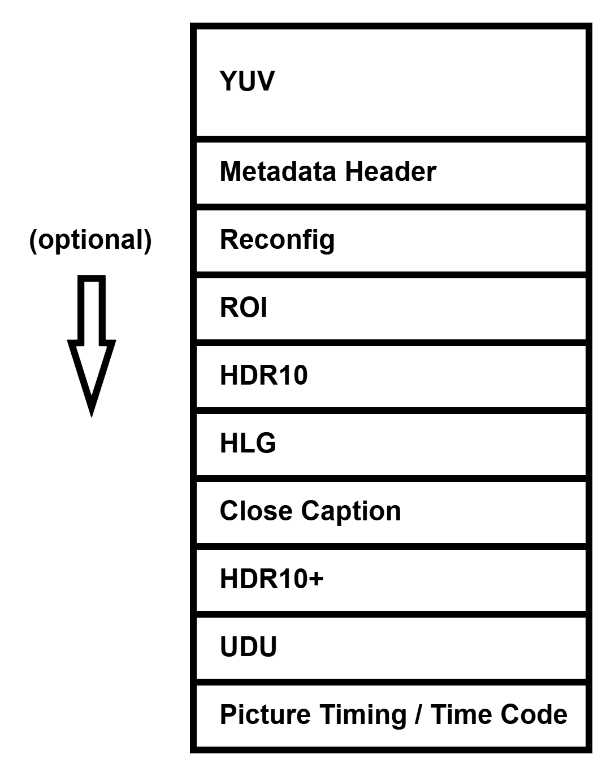
Figure 12 Encoder input layout
The libxcoder API provides a couple of functions to assist in preparing the encoder data, ni_enc_prep_aux_data and ni_enc_copy_aux_data. These functions convert and copy the auxiliary data into the format required by the encoder, so they must be called for a frame before it is sent to encoder for encoding.
For software frame encoding, the libxcoder API provides the ni_enc_write_from_yuv_buffer function. Given YUV data in a caller allocated buffer, this function prepares an encoder input data frame in the layout described above and sends the input frame to the encoder. See the ni_xcoder_encode program for an example of how this function can be used.
The retrieval and storage of auxiliary data returned by the decoder is described in section 5.5.6.1.
All SEI data (User data unregistered, HDR10, HDR10+, close caption, HLG preferred characteristics, picture timing / time code) must be in the NAL unit format for the configured codec as per the codec standard using the correct SEI specific RBSP syntax, including start and end codes, NAL header with proper start code emulation applied. This is done by libxcoder. Check the syntax definition in the H.264[5] and H.265[6] standards for more detail. The construction of these NALs is hidden from the libxcoder API user and is implemented in the functions ni_enc_prep_aux_data, ni_enc_copy_aux_data and ni_enc_insert_timecode.
Note that the Quadra Tx firmware currently supports a maximum of 1024 bytes of SEI payload.
The following sections detail frame type forcing, the ROI, reconfiguration and various other auxiliary data and their usage.
Frame Type Forcing
Frame type forcing is generally used for forcing IDR frames as needed for scene changes, commercial substitution, etc. An IDR may be forced at any point during encoding. When an IDR frame is forced mid-GOP any encoded but unsent frames are flushed and a new GOP is started.
This feature is not directly supported by the example programs. An example of frame type forcing used in the NETINT libavcodec code is as follows :
ctx->api_fme.data.frame.ni_pict_type = 0;
    if (ctx->api_ctx.force_frame_type)
    {
      switch (ctx->buffered_fme->pict_type)
      {
      case AV_PICTURE_TYPE_I:
        ctx->api_fme.data.frame.ni_pict_type = PIC_TYPE_IDR;
        break;
      default:
        ;
      }
    }
    else if (AV_PICTURE_TYPE_I == ctx->buffered_fme->pict_type)
    {
      ctx->api_fme.data.frame.force_key_frame = 1;
      ctx->api_fme.data.frame.ni_pict_type = PIC_TYPE_IDR;
    }
In this example when forceFrameType = 1, the forced frame type is set to the source frame type, and when the source frame is I-frame, the forced encode frame is IDR.
The libxcoder code that sets the metadata attributes based on the libavcodec setting is as follows:
p_meta->frame_force_type_enable = p_meta->frame_force_type = 0;
  // frame type to be forced to is supposed to be set correctly
  // in p_frame->ni_pict_type
  if (1 == p_ctx->force_frame_type || p_frame->force_key_frame)
  {
    if (p_frame->ni_pict_type)
    {
      p_meta->frame_force_type_enable = 1;
      p_meta->frame_force_type = p_frame->ni_pict_type;
  }
  }
ROI
To use the ROI feature, the following steps are required:
- The feature must be enabled by the libxcoder encode option roiEnable=1;
- An ROI QP map specifying QP values and other information need to be supplied with each YUV frame. The ROI values can change and ROI can be enabled/disabled on a frame by frame basis.
- NOTE – ROI takes no effects for 2-pass (lookaheadDepth > 0) encode
There are a few ways to provide this QP map as explained in the following sections.
Custom QP Map and Average QP
This is the lowest level API where the user supplies the details of QP to the encoder. The details of preparing this QP map are described in the Integration Programming Guide, section 10.1.7. The coding details of processing a list of rectangular ROI regions are in libxcoder API function set_roi_map in file ni_av_codec.c. This method is the most complicated but permits non-rectangular ROI regions to be defined if required.
libxcoder ROI Struct
Alternatively, libxcoder provides an ROI struct that permits a list of rectangular ROI regions to be specified:
// struct describing a Region Of Interest (ROI)
typedef struct _ni_region_of_interest
{
  // self size: must be set to: sizeof(ni_region_of_interest_t)
  uint32_t self_size;
  // ROI rectangle: pixels from the frame's top edge to the top and bottom edges
  // of the rectangle, from the frame's left edge to the left and right edges
  // of the rectangle.
  int top;
  int bottom;
  int left;
  int right;
  // quantization offset: [-1, +1], 0 means no quality change; < 0 value asks
  // for better quality (less quantisation), > 0 value asks for worse quality
  // (greater quantization).
  ni_rational_t qoffset;
} ni_region_of_interest_t;
The following code shows an example of applying ROI to a frame: for a 720p frame, the first ROI defines the real region of interest (a window in the middle of image) to be encoded with highest quality (lowest QP), and the second ROI sets the whole image to lowest quality (highest QP).
ni_aux_data_t *aux_data = NULL;
ni_region_of_interest_t *my_roi;
aux_data = ni_frame_new_aux_data(frame, NI_FRAME_AUX_DATA_REGIONS_OF_INTEREST,
				 sizeof(ni_region_of_interest_t) * 2);
my_roi = (ni_region_of_interest_t *)aux_data->data;
my_roi[0].self_size = sizeof(ni_region_of_interest_t);
my_roi[0].top    = 240;
my_roi[0].bottom = 480;
my_roi[0].left   = 320;
my_roi[0].right  = 960;
my_roi[0].qoffset.num = -1;
my_roi[0].qoffset.den = 1;
my_roi[1].self_size = sizeof(ni_region_of_interest_t);
my_roi[1].top    = 0;
my_roi[1].bottom = 720;
my_roi[1].left   = 0;
my_roi[1].right  = 1280;
my_roi[1].qoffset.num = 1;
my_roi[1].qoffset.den = 1;
Note that this example is extreme since we are requesting a QP offset of -1 for the region of interest which corresponds to the minimum QP of 0 and a QP offset of +1 for the background which corresponds to the maximum QP of 51. If rate control is disabled, the encoder will use the QP values directly as supplied by the ROI map. If rate control is enables, the QP values will be scaled up or down to meet the rate control objectives.
Note that the ROIs are specified in the order of decreasing importance, so region 1 gets applied before region 0 as shown in the analyzer display with the QP shown below:
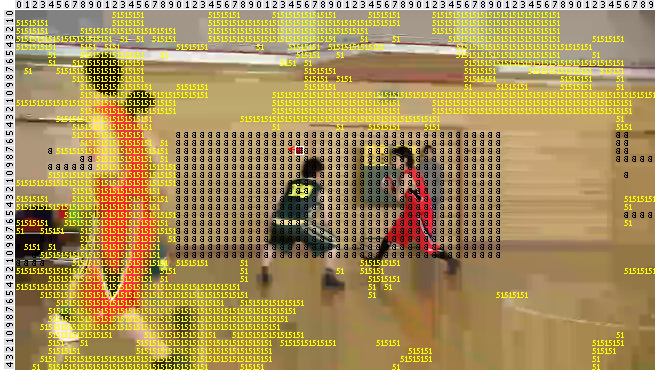
Note that with this method of ROI, the ROI map is initialized to qoffset=0. So in the example above, if only my_roi[0] is specified, then the background QP would be the default QP of the encoder.
The formula for how the encoder applies the ROI is as follows:
The QP of an ROI block (16x16 MB for H.264 or 64x64 CTU for H.265) is:
QP = (ROI QP – ROI AVG QP) + QP by RC
where:
ROI QP: the QP specified for the ROI block (1-51) in the ROI map
ROI AVG QP: the average of all the QPs of all ROI blocks
QP by RC: the QP determined by the rate control algorithm
So if ROI QP is larger than average, the rate control QP is increased (poorer quality); if it’s smaller than average, the rate control QP is decreased (better quality).
libxcoder cacheRoi Encode Option
The libxcoder ROI API is designed to specify the ROI on a single frame and needs to be specified for each frame. There is a libxcoder encoder configuration option cacheRoi that can change this behavior. By using this option, the user can specify the ROI on any frame and it will stay in effect, i.e. cached and applied to the subsequent frames, until a new one is supplied. Its usage is shown in the following command example, assuming that ROI maps have been set and applied appropriately:
ni_xcoder_transcode_filter -c 0 -i 1280x720p_Basketball.264 -o output.265 -m a -n h -e roiEnable=1:cacheRoi=1
Reconfiguration
Encoder reconfiguration is a feature that permits encoding parameters to be changed while encoding is in progress. The types of parameters that can be changed are:
- Bitrate
- Intra Period
- VUI
- Long Term Reference (LTR) frame setting
- Long Term Reference (LTR) interval setting
- Frame reference invalidation
- Framerate
- MaxFrameSize parameter setting (for details regarding maxFrameSize parameter, please refer to Integration Programming Guide)
- Max & Min qp setting
- CRF
- CRF Float
- VBVBufferSize & VBVMaxRate
- MaxFrameSizeRatio
- SliceArg
- Set long term reference (LTR) + reference invalidation
- Set long term reference (LTR) + reference invalidation + use LTR prediction
Encoder reconfiguration is not currently supported with JPEG encoding.
The Long Term Reference (LTR) feature has been explained in detail in Quadra Integration & Programming Guide[1], section 8.3.1.
The examples of LTR reconfiguration feature are presented in section 5.6.7.7.2. The same reconfiguration tasks can be accomplished by using the wrapper API without providing a frame.
The following is an example of bitrate reconfiguration using auxiliary data attached to a frame being sent to encoder.
Libxcoder auxiliary data type NI_FRAME_AUX_DATA_BITRATE is used to represent bitrate data. The actual data payload type is int32_t which represents the bitrate to set.
A frame’s auxiliary data supporting this feature can be constructed and inserted into a frame as follows:
ni_aux_data_t *aux_data = NULL ;
aux_data = ni_frame_new_aux_data(frame, NI_FRAME_AUX_DATA_BITRATE,
                                 sizeof(int32_t));
if (aux_data)
{
  *((int32_t *)aux_data->data) = bitrate;
}
HLG Preferred Transfer Characteristics
The libxcoder encode option prefTRC specifies the preferred transfer characteristics value. If this parameter is present, the encoder will include an alternative transfer characteristics SEI in the bitstream with the preferred transfer characteristics field set to the value of this parameter. This SEI is required by ETSI for HLG and specifies an alternative transfer characteristics from that is provided in the VUI.
The handling of this SEI at encoding is done automatically by libxcoder. Note that currently, libxcoder does not support this SEI on the decoder side.
User Data Unregistered SEI
Handling of User Data Unregistered (UDU) SEI is done automatically by libxcoder. The UDU data is retrieved and stored in the frame as auxiliary data of type NI_FRAME_AUX_DATA_UDU_SEI after decoding, and it is converted into appropriate form and sent to encoder at encoding. Refer to APPS520[3] for more details.
Picture Timing / Time Code SEI
The ni_enc_insert_timecode function (from ni_av_codec.h) provides an interface for inserting arbitrary timecode data into the picture timing SEI (for H264) or time code SEI (for H265) in each frame. The timecode data shall be given to this function in a caller-allocated ni_timecode_t struct. This function must be called after ni_enc_prep_aux_data and ni_enc_copy_aux_data have handled all the other types of aux data so that the picture timing / time code SEI will be appended to the end of the buffer being sent to encoder.
When using H264 encoder:
- If hrdEnable=0, the enableTimecode encoder configuration parameter must be enabled at the same time to set the pic_struct_present flag in VUI. Otherwise, the timecode data will not be recognized in the encoded stream. See “Encoding Parameters” in the Integration Programming Guide for more information on the enableTimecode option.
- If hrdEnable=1, enableTimecode does not need to be set. In this case the timecode in the picture timing SEI automatically generated for HRD conformance are replaced by the provided timecode, while the other parameters in the picture timing SEI are untouched to ensure HRD conformance. Note that this use case is only supported since Quadra release 5.8. Using timecode insertion with hrdEnable=1 in previous releases will produce non-spec-compliant output streams.
When using H265 encoder, there’s no extra requirements or limitations since H265 has a standalone time code SEI type.
The following code provides an example of inserting timecode data using ni_enc_insert_timecode:
// Make sure ni_enc_prep_aux_data and ni_enc_copy_aux_data
// are called before ni_enc_insert_timecode so that the
// frame data layout is correct
ni_enc_prep_aux_data(
        p_enc_ctx, p_enc_frame, p_dec_frame,
        p_enc_ctx->codec_format, should_send_sei_with_frame,
         mdcv_data, cll_data, cc_data, udu_data, hdrp_data);
ni_enc_copy_aux_data(p_enc_ctx, p_enc_frame, p_dec_frame,
        p_enc_ctx->codec_format, mdcv_data, cll_data,
         cc_data, udu_data, hdrp_data, is_hwframe,
         is_semiplanar);
// Allcoate ni_timecode_t and set the fields in it with the
// desired values
ni_timecode_t timecode = {0};
timecode.full_timestamp_flag = 1;
timecode.seconds_value = 42;
timecode.minutes_value = 19;
timecode.hours_value = 7;
. . . (Set all other fields as needed)
// Call the API to format and append the data to the frame
// buffer being sent to the encoder
ni_enc_insert_timecode(p_enc_ctx, p_in_frame, &timecode);
Long Term Reference Frame
The Long Term Reference (LTR) feature preserves 1 or 2 frames in DPB for long term reference, so that these LTR frames can be used as alternative references when reference invalidation is required.
The following libxcoder APIs allow application to set any frame as LTR, or change LTR interval during run-time.
Prerequisites - To use LTR feature, the following steps are required:
- LTR feature must be enabled by libxcoder encode option longTermReferenceEnable=1;
- LTR information needs to be supplied with the desired YUV frame, in the form of auxiliary data.
- (Optional) libxoder encode option longTermReferenceInterval=# for periodic LTR. If 0, Quadra will not periodically set frame as LTR except for the first frame
- If longTermReferenceInterval \ > 0, setting current frame as long term reference overrides the interval
Set Current Frame as LTR
The following struct is required to set current frame as LTR:
typedef struct _ni_long_term_ref
{
  // A flag for the current picture to be used as a long term reference
  // picture later at other pictures’ encoding
  uint8_t use_cur_src_as_long_term_pic;
  // A flag to use a long term reference picture in DPB when encoding the current picture
  uint8_t use_long_term_ref;
} ni_long_term_ref_t;
Libxcoder provides two methods for application to choose from - (1) create frame auxiliary data or (2) call wrapper API
Method 1 – Create frame auxiliary data
A frame’s auxiliary data supporting this feature can be constructed and inserted into a frame as follows:
ni_long_term_ref_t *p_ltr ;
ni_aux_data_t *aux_data = NULL ;
aux_data = ni_frame_new_aux_data(
    frame, NI_FRAME_AUX_DATA_LONG_TERM_REF,
    sizeof(ni_long_term_ref_t)) ;
if (aux_data)
{
  p_ltr = (ni_long_term_ref_t *)aux_data->data;
  p_ltr->use_cur_src_as_long_term_pic = 1;
}
Method 2 – Wrapper API
Wrapper API also exists which can set the current frame as LTR. The API is showcased in the example programs in function prep_reconf_demo_data (from ni_encode_utils.c) as follows:
case XCODER_TEST_RECONF_LTR_API:
if (p_enc_ctx->frame_num ==
api_param->reconf_hash[g_reconfigCount][0])
{
ni_long_term_ref_t ltr;
ltr.use_cur_src_as_long_term_pic =
(uint8_t)api_param->reconf_hash[g_reconfigCount][1];
ltr.use_long_term_ref =
(uint8_t)api_param->reconf_hash[g_reconfigCount][2];
ni_set_ltr(p_enc_ctx, <r);
ni_log(NI_LOG_DEBUG, "%s(): frame #%lu API set LTR\n",
__func__, p_enc_ctx->frame_num);
p_ctx->reconfig_count++;
}
break;
Change LTR Interval during run-time
Libxcoder provides two methods for application to choose from - (1) create frame auxiliary data or (2) call wrapper API
Method 1 – Create frame auxiliary data
A frame’s auxiliary data supporting this feature can be constructed and inserted into a frame as follows:
ni_aux_data_t *aux_data = NULL ;
aux_data = ni_frame_new_aux_data(
    frame, NI_FRAME_AUX_DATA_LTR_INTERVAL,
    sizeof(int32_t));
if (aux_data)
{
 *((int32_t *)aux_data->data) = ..; // new LTR interval
}
Method 2 – Wrapper API
Wrapper API also exists which can set the current frame as LTR. The API is showcased in the example programs in function prep_reconf_demo_data (from ni_encode_utils.c) as follows:
case XCODER_TEST_RECONF_LTR_INTERVAL_API:
if (p_enc_ctx->frame_num ==
   api_param->reconf_hash[g_reconfigCount][0])
{
    ni_set_ltr_interval(p_enc_ctx,
       api_param->reconf_hash[g_reconfigCount][1]);
    ni_log(NI_LOG_DEBUG, "%s(): frame #%lu API set LTR interval %d\n",
           __func__, p_enc_ctx->frame_num,
           api_param->reconf_hash[g_reconfigCount][1]);
    p_ctx->reconfig_count++;
}
break;
Reference Invalidation
Reference invalidation is used by the receiver of the bitstream to invalidate and change the encoding frames’ references when the received packet is corrupted (and therefore cannot be referenced).
Libxcoder provides two methods for application to choose from - (1) create frame auxiliary data or (2) call wrapper API
Method 1 – Create frame auxiliary data
A frame’s auxiliary data supporting this feature can be constructed and inserted into a frame as follows:
ni_aux_data_t *aux_data = NULL ;
aux_data = ni_frame_new_aux_data(
    frame, NI_FRAME_AUX_DATA_INVALID_REF_FRAME,
    sizeof(int32_t));
if (aux_data)
{
 *((int32_t *)aux_data->data) = ..; // frame number to invalidate
}
Method 2 – Wrapper API
Wrapper API also exists which can invalidate reference. The API is showcased in the example programs in function prep_reconf_demo_data (from ni_encode_utils.c) as follows:
case XCODER_TEST_INVALID_REF_FRAME_API:
if (p_enc_ctx->frame_num ==
    api_param->reconf_hash[g_reconfigCount][0])
{
    ni_set_frame_ref_invalid(p_enc_ctx,
        api_param->reconf_hash[g_reconfigCount][1]);
    ni_log(NI_LOG_DEBUG,
        "%s(): frame #%lu API set frame ref invalid %d\n",
        __func__, p_enc_ctx->frame_num,
        api_param->reconf_hash[g_reconfigCount][1]);
    p_ctx->reconfig_count++;
}
break;
Max&Min qp reconfig
Libxcoder provides two methods for application to choose from – (1) create frame auxiliary data or (2) call wrapper API.
Method 1-Create frame auxiliary data
A frame’s auxiliary data supporting this feature can be constructed and inserted into a frame as follows:
aux_data = ni_frame_new_aux_data(&dec_frame,
NI_FRAME_AUX_DATA_MAX_MIN_QP,
sizeof(ni_rc_min_max_qp));
if (aux_data) {
ni_rc_min_max_qp *qp_info = (ni_rc_min_max_qp *)aux_data->data;
qp_info->minQpI	= …;
qp_info->maxQpI	= …;
qp_info->maxDeltaQp	= …;
qp_info->minQpPB	= …;
qp_info->maxQpPB	= …;
}
Method 2 – Wrapper API
Wrapper API also exists which can reconfig QP. The API is showcased in the example programs in function prep_reconf_demo_data (from ni_encode_utils.c) as follows:
case XCODER_TEST_RECONF_RC_MIN_MAX_QP_API:
if (ctx->api_ctx.frame_num ==
p_param->reconf_hash[p_ctx->reconfig_count][0]) {
ni_rc_min_max_qp qp_info;
qp_info.minQpI = …;
qp_info.maxQpI = …;
qp_info.maxDeltaQp = …;
qp_info.minQpPB = …;
qp_info.maxQpPB = …;
ni_reconfig_min_max_qp(p_enc_ctx, &qp_info);
p_ctx->reconfig_count++;
}
break;
Wrapper API
In the previous sections, it is shown that auxiliary data can be used to pass on to encoder information for encoding. The auxiliary data is usually attached to a frame and sent to encoder together with the frame data. Sometimes user needs to send such information to encoder without providing a frame. Wrapper API functions are provided to accomplish this such that the required information will be sent to encoder with the next frame sending out.
The available API functions are:
- Bitrate reconfiguration: ni_reconfig_bitrate
- Intra period reconfiguration: ni_reconfig_intraprd
- VUI reconfiguration: ni_reconf_vui
- IDR frame forcing: ni_force_idr_frame_type
- Long Term Reference frame setting: ni_set_ltr
- Long Term Reference interval setting: ni_set_ltr_interval
- Frame reference invalidation: ni_set_frame_ref_invalid
- Framerate reconfiguration: ni_reconfig_framerate
- maxFrameSize parameter setting reconfiguration: ni_reconfig_max_frame_size (for details regarding maxFrameSize parameter, please refer to Integration Programming Guide)
- Max&Min qp setting: ni_reconfig_min_max_qp
- CRF setting: ni_reconfig_crf and ni_reconfig_crf2 (for details regarding crf parameter and its reconfiguration, please refer to Integration Programming Guide section 8.4 “Encoding Parameters” for crf and ReconfDemoMode descriptions)
- VBV value setting: ni_reconfig_vbv_value
- maxFrameSizeRatio parameter setting reconfiguration: ni_reconfig_max_frame_size_ratio (for details regarding maxFrameSizeRatio parameter, please refer to Integration Programming Guide)
- SliceArg setting: ni_reconfig_slice_arg
- Set long term reference (LTR) + reference invalidation: ni_set_ltr and ni_set_frame_ref_invalid
- Set long term reference (LTR) + reference invalidation + use LTR prediction: ni_set_ltr and ni_set_frame_ref_invalid
NETINT Encoder Output PSNR and SSIM
Encoder can be configured to output PSNR and SSIM by the following xcoder parameters –
PSNR: getPsnrMode and intervalOfPsnr
SSIM: enableSSIM
Please refer to Quadra Integration and Programming Guide document Section 8.3 “Encoding Parameters” for detailed descriptions about the usages and limitations of the parameters listed above
When PSNR and/or SSIM is enabled, application may retrieve each encoded frame’s PSRN / SSIM via ni_packet_t struct fields psnr_y, psnr_u, psnr_v, average_psnr, ssim_y, ssim_u, ssim_v.
Please refer to Section 5.6.1 “Encoding loop” in this document for more descriptions about ni_packet_t struct.