HW Frame for Raw Video Transfer
Terminology
The terms for software (SW) frames and hardware (HW) frames correspond to where the frame exists. Simply put, a SW frame is a raw video frame that exists on the host machine in its memory. A HW frame is a raw video frame that exists on the VPU/GPU device and can be referenced through the API.
Pathways and Features
On the host machine, SW frames can be modified and filtered or used freely. However HW frames can only be used in some circumstances. To generate an original HW frame, the uploading instance may be used for SW frame to HW frame conversion (section 5.9). Alternatively, the decoder can produce HW frames as an alternative to SW frame outputs with the decoding parameter:
out=hw
With the Quadra T1A, the accepted frame inputs to its functional features are detailed in Figure 3 below:
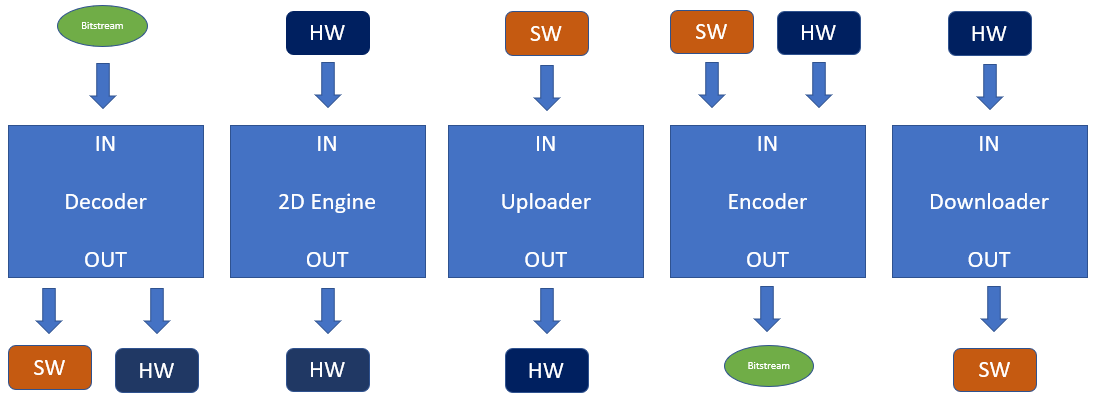
Figure 3 Input output mapping
The question, When is it better to use HW frames over SW frames? will now be discussed. The benefits for each depend on, whether the YUV needs to be modified off-device, encoding ladder use, available resources, and many other conditions.
In a transcoding scenario, if the intermediate YUV does not need any other processing besides encoding, then bypassing the hefty YUV transfer to the host by using HW frames is preferable and much faster.
HW frames are also more viable when multiple encoding ladders need to operate on the same set of decoded output. A single HW frame can be referenced by X number of encoders simultaneously, which means for the work of generating, sending and storing a single input, we can get X outputs. This can be demonstrated by running the following example HW upload and ladder encoding command:
ni_xcoder_encode -i test/akiyo_352x288p25.yuv -s 352x288 -p yuv420p -m a -u -e RcEnable=1:bitrate=20000000 -o lad1.264 -e RcEnable=1:bitrate=400000 -o lad2.264 -e RcEnable=1:bitrate=600000 -o lad3.264
The above command performs a hardware upload of a given frame, then encode 3 different bitrates of that frame and receive the 3 outputs back on the host.
A downside of utilizing HW frames is that the frames used by the host must be tracked meticulously, they must also be recycled on time, in order to prevent any resource lock-ups or memory leakages during runtime. When a HW frame is no longer in use ni_hwframe_buffer_recycle2 must be called to let the device know the buffer can be reused, and to free the descriptor on the host.
The structure used to store the details of a HW frame contains this:
typedef struct _niFrameSurface1
{
  uint16_t ui16FrameIdx;      //frame location on device
  uint16_t ui16session_ID;    //for instance tracking
  uint16_t ui16width;         // width on device
  uint16_t ui16height;        // height on device
  uint32_t ui32nodeAddress;   //currently not in use, formerly offset
  int32_t device_handle;      //handle to access device
  int8_t bit_depth;           //1 == 8bit per pixel, 2 == 10bit
  int8_t encoding_type;       //0 = semiplanar, 1 = semiplanar, 2 = tiled4x4
  int8_t output_idx;          // 0-2 for decoder output index
  int8_t src_cpu;             // frame origin location
  int32_t dma_buf_fd;         // P2P dma buffer file descriptor
} niFrameSurface1_t;
Limitations
Since the HW frame consumes real memory on the Quadra T1 card, there is a maximum limit to how many can co-exist simultaneously. Currently, the minimum bin size is enough to fit half a YUV420 8-bit frame at 1080p so any smaller resolution will still consume the same amount of video memory on device.
The ni_rsrc_mon tool can be used to check the currently consumed video memory under the “SHARE_MEM” data column. Note that SW frames will also consume this memory resource but its freeing is not controlled by the host application SW.
Another limitation is that all HW frames can only be used if the producer is from the same device. On a host machine with multiple Quadra T1 cards, if device 0 produces HW frame A, then device 2 cannot use HW frame A as an input directly. If the user should want device 2 to process a frame from device 0, the HW frame must first be downloaded and device 2 would work with a SW frame. The resulting SW frame is then available for upload onto device 2.