Sourcing MSYS2 environment from Windows Environment Variables
This section is optional. Proceed with the step below to add msys paths to the $PATH on windows.
In Windows Control Panel -> System -> Advanced System Settings -> System Properties -> Environment Variables… -> System Variables -> Path -> Edit you can add new environment variables for C:\msys64 as per sample picture below. Use the Move Up button to prioritize the C:\msys64 paths over C:\Windows paths.
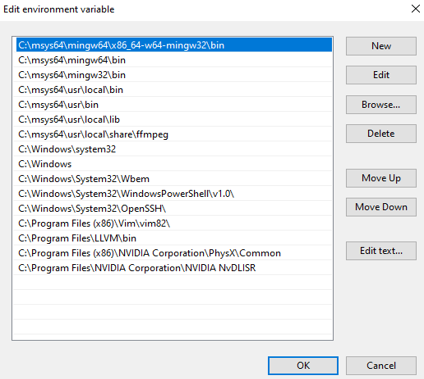
This will configure MSYS2 linux type commands from the Windows Command Terminal. Once the above is configured, open a new Windows Command Terminal and test the commands:
which bash
which sh
which ffmpeg.exe
which init_rsrc.exe